

For your accounting practice, Making Tax Digital VAT software is not just a tool to stay MTD compliant; it’s the difference between smooth submissions and last-minute panic. Take your instance during the VAT deadline day, and one of your clients’ spreadsheets won’t upload. Their figure doesn’t match the VAT return summary. The portal rejects its submission, and the client calls you up.
Are you facing the same scenario?
Making Tax Digital was introduced in 2019, and its rules became applicable to VAT-registered businesses above the threshold of £85,000. From April 2022, all VAT-registered businesses, regardless of turnover, must be MTD compliant. Still, compliance errors persist due to poor digital record-keeping and incompatible systems.
This guide will break down everything you need to know about Making Tax Digital VAT software, including what to use, what to avoid, and how to future-proof your practice.
What Is Making Tax Digital for VAT? (And Why It Matters)
Making Tax Digital for VAT is an HMRC initiative to modernise the UK tax system by making it compulsory to keep records in digital format and doing electronic VAT submissions through an MTD-compliant software.
Under MTD rules:
- VAT records must be stored digitally
- Use of MTD compatible software only
- Submission of VAT returns must be done directly via software
The goal of MTD for VAT is to reduce errors.
According to HMRC, avoidable taxpayer errors cost billions annually in lost revenue. MTD aims to reduce this “tax gap” through digital accuracy. For accounting practices, this means one thing: the days of manual spreadsheets and copy-paste submissions are over and no longer safe. It’s time to get MTD compliance right.
What Is MTD Compatible Software and What Makes It “Compatible”?
Not all accounting software is MTD-compatible.
An MTD-compatible software will:
- Connect directly to HMRC’s MTD API
- Submit VAT returns electronically
- Maintain digital audit trails
- Support digital record keeping
A MTD compatible software is more than just being able to file VAT. It means:
- No manual re-keying
- Proper digital links
- Secure submission channels
If there is any manual intervention, then the risk of being non-compliant rises.
Best Software for Making Tax Digital for VAT in 2026
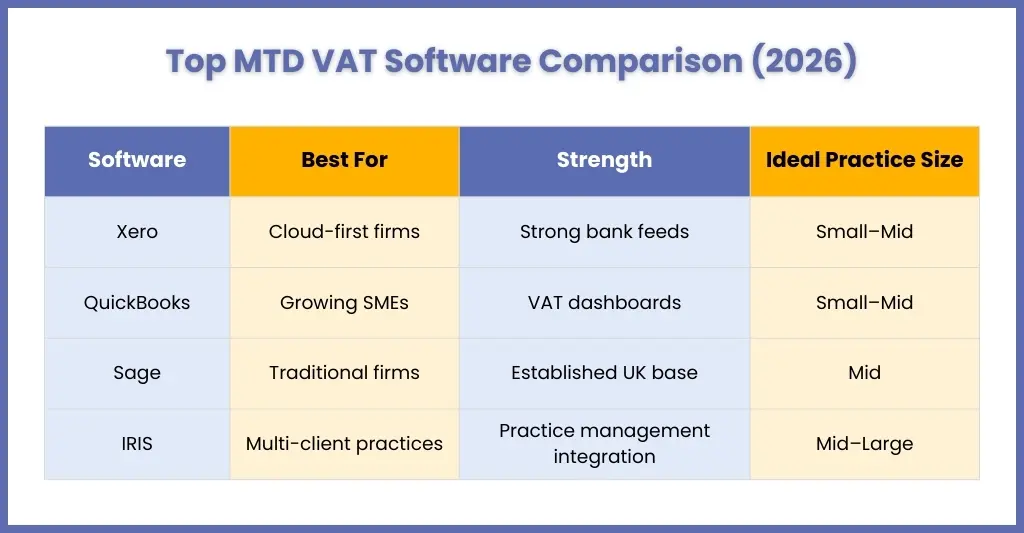
When you are on a hunt for the best software for Making Tax Digital for VAT, don’t just consider the functionality, you must consider three core pillars:
- Compliance strength
- Integration capability
- Scalability for growing client bases
Here are widely used options:
Xero
It is one of the most popular accounting platforms among accounting practices. Why is that so?
- Direct MTD VAT submission via HMRC API
- Real-time VAT return dashboards
- Automatic VAT calculation and error flags
- Strong bank feed integrations
- Multi-user access for collaboration
QuickBooks Online
QuickBooks has a significant hold in the UK accounting market thanks to its features, which include.
- Built-in VAT submission tools
- Strong reporting and dashboard visibility
- Automated VAT tracking
- Good integration with third-party apps
Sage Accounting
Sage has long-standing credibility in the UK market.
Strengths include:
- Integrated VAT return submission
- Established reputation with traditional businesses
- Strong reporting features
- Desktop and cloud flexibility (depending on version)
IRIS
Designed for accounting practices that handle multiple clients, IRIS is built for practices that are scaling up and expanding.
Why practices use IRIS:
- Multi-client management functionality
- Centralised VAT submission tracking
- Integration with practice management tools
- Compliance-focused workflow design
Making Tax Digital VAT Software for Spreadsheet Users: Do You Need Bridging Software?
Let’s admit that many accounting practices, even those that are digitised, love Excel. It is easy to understand, use, well-known, and fast in its own right. However, the problem is HMRC does not accept them anymore under the Make Tax Digital rules.
Those practices still using Excel for VAT calculations must use bridging software to remain compliant, and this is where some practices lack.
- Why Spreadsheets Alone Are Not Enough
Under HMRC’s MTD for VAT regulations, practices are required to:
- Keep digital VAT records
- Maintain digital links between systems
- Submit VAT returns via MTD-compatible software
Yes, Excel can store digital records, but issues crop up when:
- Figures are copied manually into HMRC’s portal
- Adjustments are made outside the digital chain
- Totals are re-keyed manually
Manual copy-paste breaks the digital link requirement, and HMRC has been clear: digital links must be preserved throughout the process.
- So What Exactly Is Bridging Software?
Bridging software works like a connector between your spreadsheet and HMRC’s MTD system.
The software does three things:
- Connects your Excel file to HMRC’s API
- Maintains digital links between VAT data fields
- Submits VAT returns electronically
Instead of typing totals into the HMRC portal, the software pulls the figures directly from your spreadsheet and sends them digitally, meaning no manual intervention.
How to Sign Up for Making Tax Digital for VAT — Step-by-Step
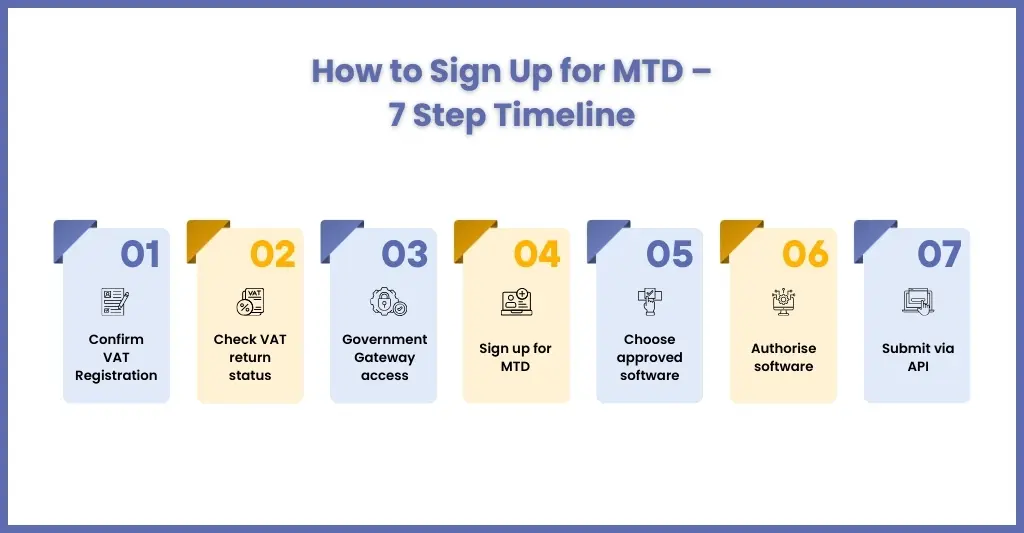
Let’s keep the records straight, almost all VAT-registered businesses are in MTD for VAT due to HMRC’s auto-enrolling for new VAT registrations. However, you might come across some new clients who are not properly signed up. The steps below will help make that task easy.
Step 1: Confirm That Your Client Is VAT Registered
Before even starting on MTD, confirm a few things:
- The client has a valid VAT Registration Number (VRN)
- Their VAT return frequency (monthly/quarterly/annual accounting scheme)
- Which VAT period is next due and when?
It matters because the timing of sign-up is sensitive, especially if they pay by Direct Debit.
Step 2: Check Current VAT Return Status
Also, check if your clients are still using the old VAT online account process, which is not allowed by HMRC; only MTD-compatible filing is allowed.
Step 3: Create/Confirm Government Gateway Access
The client will need access to their business tax account (via Government Gateway). Confirm the login works and the VAT account is visible
Step 4: Sign up for MTD for VAT on GOV.UK
If your client needs to sign up, follow HMRC timing guidance:
If they pay VAT by Direct Debit:
- Do not sign up within:
- 7 days before the VAT return is due, or
- 5 days after the VAT return is due
This avoids payment duplication issues.
If they don’t pay by Direct Debit:
- Sign up at least 3 days before the VAT return is due.
This step is where you save clients from panic. The “sign up” isn’t hard; it’s the timing that trips people up.
Step 5: Choose and Connect To Making Tax Digital VAT Software (HMRC-approved)
Select an appropriate Making Tax Digital VAT software that can:
- Keep digital VAT records
- Submit VAT returns through HMRC’s MTD API
Step 6: Authorise the Software
Once selected and signed up, client authorisation for the software is needed to interact with HMRC.
The flow will be:
- Client logs into the software
- Clicks “Connect to HMRC” / “Authorise”
- Logs into Government Gateway when prompted
- Grants permission
When software is installed but not authorised, it leads to submission failure during the deadline.
Step 7: Submit the VAT Return Through Software
VAT returns must be submitted via MTD-compatible software that your client is enrolled in. After submission, a submission receipt will be generated, which must be stored for compliance and for maintaining an audit trail.
Making Tax Digital VAT Software for Accountants and Tax Agents
For practices managing multiple clients, MTD brings operational challenges:
- Managing authorisations
- Tracking VAT deadlines
- Ensuring digital record integrity
- Reviewing submission accuracy
This is where structured workflow support becomes critical.
Rather than simply using Making Tax Digital VAT software, successful firms:
- Standardise VAT processes
- Use review checklists
- Align bookkeeping with submission cycles
- Implement layered controls
At Corient UK, we support practices with structured VAT preparation workflows aligned to MTD requirements, reducing last-minute stress and compliance exposure.
What’s Coming Next — MTD for Income Tax and the Future of Digital Tax
HMRC has introduced Making Tax Digital, not to get stuck at VAT. From April 2026, MTD for Income Tax Self-Assessment will be applicable on:
- Sole traders
- Landlords
- Income over £50,000 (threshold reducing later)
Those practices that have already taken this expansion into consideration are already future-ready. After all, the MTD reform is not a temporary or one-off reform; it’s going to change the future of accounting in the UK.
Frequently Asked Questions About Making Tax Digital VAT Software
What is the best free Making Tax Digital VAT software?
There is no free Making Tax Digital VAT software available in the market. However, if you are willing to pay than for accounting practices Xero or QuickBooks will be the ideal ones.
Can I integrate Sage with other accounting software for MTD?
Yes, Sage integrates with other systems and supports direct MTD submission. Always verify compatibility through HMRC’s approved software list.
What are the penalties for not using MTD VAT software?
VAT filing cannot be done without using an MTD-compliant software. Not using an MTD-compliant software will result in penalties of up to £400 for every return you file.
Is MTD for VAT compulsory?
Since April 2022, MTD for VAT became mandatory for all VAT-registered businesses.
Who needs to do MTD for Income Tax?
Businesses, self-employed people and landlords will be required: to operate MTD from 6 April 2026 in relation to their trading and property income chargeable to Income Tax and Class 4 National Insurance contributions, if their total qualifying income from these income sources for a tax year exceeds £50,000.
Conclusion
Coming back to your client’s panic during VAT submissions, it can be avoided through an MTD VAT software, but it’s not a complete solution. The reason for this panic is due to the unstructured processes and incompatible systems. Along with the software, you will need to invest in:
- Clean bookkeeping
- Structured digital workflows
- Review controls
- Scalable support
At Corient, you can get both. We work alongside practices to strengthen VAT preparation, ensure MTD compliance, and reduce deadline stress, allowing your team to focus on advisory rather than firefighting.
Are you ready to adopt the Make Tax Digital Ready? Connect with us and be future-ready.
