
Xero is good for scalability, integrations, and growing practices, and QuickBooks Online is better for flexibility, ease of use, and multi-client management. As an owner of an accounting practice in the UK, when you have to choose between Xero and QuickBooks online, a real question will arise in your mind.
“Which is better, Xero Vs QuickBooks Online?”
And the answer to this question will be:
“Which works better for my clients, my team, and my workflow?”
Let’s understand it even better with an example:
An accounting practice based in the UK had onboarded 15 new clients in 6 months. The practice started using QuickBooks online because it was easy to use. But has the number of client’s and transaction volume increased the practice started facing issues in:
- Managing multiple integrations
- Scaling workflows
- Standardising processes
When it switched to Xero, it faced difficulty in onboarding clients, but after that, the operation became smoother. We can reach a conclusion that there is no one-size-fits-all answer in the Xero vs QuickBooks Online debate.
With HMRC expanding the Making Tax Digital Initiative in April 2026 on Income Tax, it’s high time to select the best accounting software to keep your clients compliant.
In this guide, we’ll break down:
- Pricing
- Features
- Usability
- MTD readiness
- and which platform suits your practice best
Xero Vs QuickBooks Online — A Quick Overview
Both Xero and QuickBooks Online are trusted platforms with cloud accounting features used widely by accounting practices across the UK.
Let’s get a quick overview of this software:
| Feature | Xero | QuickBooks Online |
| Ease of Use | Moderate (needs setup) | Easy (quick to start) |
| Integrations | Extensive | Strong |
| Reporting | Advanced | Customisable |
| Scalability | High | Moderate to High |
| MTD Compliance | Yes | Yes |
Xero is more focused on automation and integrations, while QuickBooks Online focuses on simplicity and flexibility.
Both are dependable, HMRC recognised and support the latest 2026 MTD for Income Tax compliance.
Pricing Plans — What Do You Actually Pay in 2026?
Pricing is not the only factor, but is often seen as a deciding factor in the Xero vs QuickBooks Online comparison.
Xero Pricing (Approx. UK)
- Ignite: Usually £16
- Grow: Usually £37
- Comprehensive: Usually £50
- Ultimate: Usually £65
QuickBooks Online Pricing (Approx. UK)
- Sole Trader Plus: £10
- Simple Start: £16
- Essentials: £38
- Plus: £56
- Advanced: £123
It’s important to consider that these are all base prices; you must also consider some additional costs in the form of:
- Payroll add-ons
- Integrations (Dext, Hubdoc, etc.)
- Additional users
Lastly, don’t base your selection only on the price but also on the value you are getting, which will help your practice grow further.
Key Features Comparison — What Matters Most to UK Practices
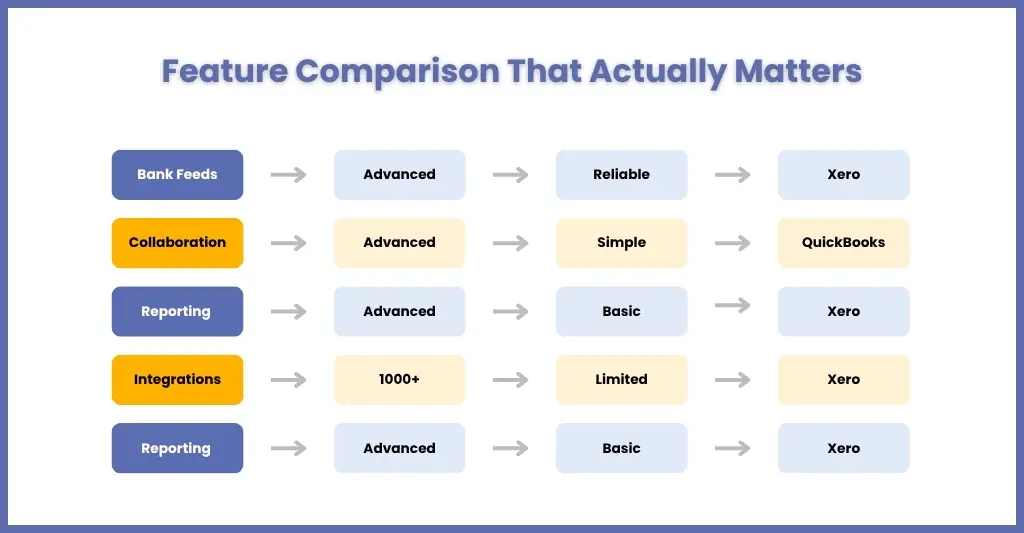
You must have read many blogs while comparing Xero vs QuickBooks online list features. But like other accounting practices, you are not interested in knowing which platform makes your day-to-day work easier, faster, and more scalable.
Let’s break this down based on what actually impacts your workflow, your team, and your clients.
Bank Feeds & Automation
This is one of the most critical features for any practice. Because a large part of your team’s time goes into reconciliation and transaction management.
Xero
- Highly automated bank feeds
- Smart reconciliation suggestions
- Rules-based transaction matching
- Smooth bulk reconciliation
Resulting in:
- Less manual work, faster processing, and fewer errors
QuickBooks Online
- Reliable bank feeds
- Auto-categorisation features
- Simpler reconciliation interface
Resulting in:
- Easier for beginners, but slightly less powerful automation.
The winner is Xero for efficiency.
If your goal is to reduce bookkeeping time across multiple clients, then Xero delivers it.
Collaboration with your Clients
Your software doesn’t just affect your team; it directly impacts the collaboration with your clients.
Xero
- Multi-user access with role-based permissions
- Strong visibility into financial data
- Real-time updates across users
Best for:
- Practices working closely with clients who insist on financial insights.
QuickBooks Online
- Easy onboarding process
- Simple interface for non-accountants
- Strong mobile app for client use
Best for:
- Clients who want to keep it simple and intuitive.
The winner is QuickBooks for simplicity.
If your clients are not financially savvy, QuickBooks is easier for them to adopt.
Reporting & Insights
This will help your practice move from compliance towards high-value advisory services.
Xero
- Advanced reporting tools
- Custom financial reports
- Better dashboard visibility
- Integration with tools like Fathom for deeper insights
Result is:
- Stronger advisory capability.
QuickBooks Online
- Customisable reports
- Easy-to-understand dashboards
- Good for basic financial analysis
Limitation:
- Not as advanced for complex reporting needs.
The winner is Xero for its depth.
If your goal is to offer advisory services, then Xero will give you more analytical power.
Integrations
The best accounting software is the one that integrates well with other accounting systems and tools without much effort.
Xero
- 1,000+ integrations
- Works seamlessly with tools like Dext, Hubdoc, Stripe, and PayPal
- Strong automation across workflows
Result is:
- A fully connected accounting environment.
QuickBooks Online
- Strong integrations
- Covers most essential tools
- Slightly smaller ecosystem
Winner in this is Xero.
If your practice relies on multiple tools, then Xero will be the best choice because it integrates smoothly.
Ease of Use
This is where many decisions are made.
Xero
- Clean interface
- Requires initial setup and training
- Slight learning curve
Result is:
- More powerful, but takes time to master.
QuickBooks Online
- Very user-friendly
- Quick onboarding
- Minimal training required
Result is:
- Faster adoption for both teams and clients.
The winner is QuickBooks.
If you want something your clients can start using immediately, then QuickBooks is the best bet.
Which is Better for Your Practice?
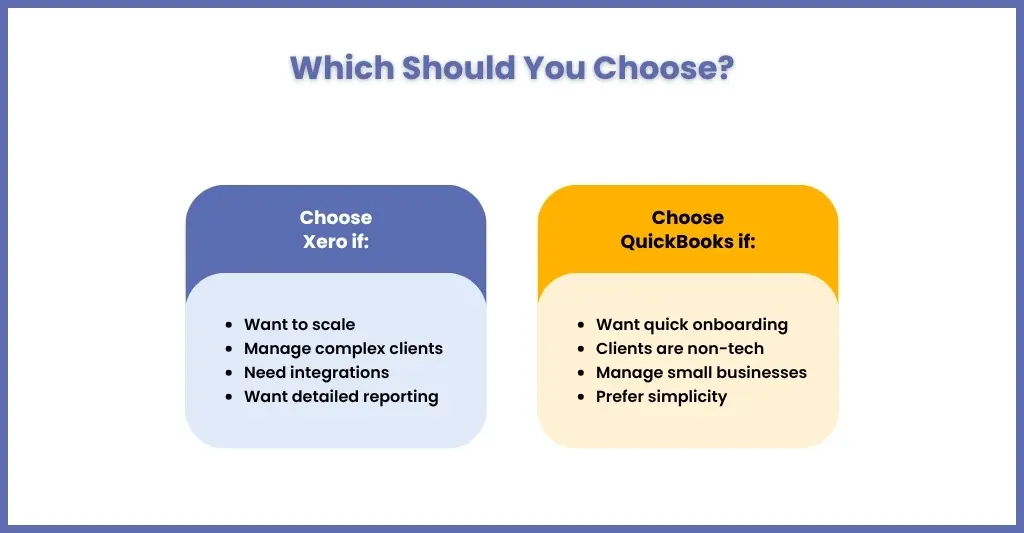
That depends on your practice size, future plans, and the clients you serve.
Choose Xero if:
- You want to scale your practice
- You manage multiple complex clients
- You rely on integrations and automation
- You want detailed reporting
Go for QuickBooks Online if:
- You want quick onboarding
- Your clients are less tech-savvy
- You manage smaller businesses
- You prefer simplicity
Real-world approach:
- Many UK practices use both platforms depending on client type.
Smart practices don’t choose one; they choose what works best for each client. And even smarter practices choose to use both these cloud accounting software’s through accounting outsourcing services of service provider without buying or installing them, thus saving cost.
Frequently Asked Questions
Is Xero or QuickBooks better for UK accounting practices in 2026?
Both Xero and QuickBooks are reliable and trusted by most practices across the UK. Xero is ideal for practices that are looking for scale and automation, and QuickBooks is perfect for those who want ease of use and quick onboarding of clients. Choose as per your requirements and the client’s needs.
Is Xero or QuickBooks better for MTD for Income Tax from April 2026?
Both platforms are MTD-compliant and support digital record-keeping and submissions. The choice depends more on workflow preference than compliance capability.
Which has better customer support — Xero or QuickBooks?
Xero’s interface is generally more modern and intuitive, while QuickBooks offers more robust customer support options with shorter wait times.
What accounting software does HMRC recommend?
HMRC does not officially recommend specific software brands, but it likes you to use software that is MTD-compatible, and Xero and QuickBooks are among them.
Final Verdict — Xero Vs QuickBooks Online for UK Accounting Practices
There is no clear winner in Xero vs QuickBooks Online, but you can come to a conclusion.
- If your goal is growth, automation, and scalability → Xero
- If your goal is simplicity, speed, and ease of use → QuickBooks Online
But here’s what every practice misses out on: software alone doesn’t solve all the problems. It has come to our notice that many practices struggle even after choosing a software due to:
- Inconsistent processes
- Lack of time
- Increasing client workload
Many practices are resorting to getting cloud software support through experienced outsourced support like Corient.
With Corient, you can:
- Manage bookkeeping within Xero or QuickBooks
- Maintain real-time accuracy
- Handle multiple clients efficiently
- Scale without hiring
Partner with us and share your requirements through our contact form, and get stress-free with regard to operating cloud software with perfection.