
Accounting automation software is technology that handles bookkeeping, reconciliation, document capture and VAT preparation with minimal manual input. For UK practices in 2026, the leading options are Xero, QuickBooks Online, Sage, Dext, AutoEntry and Hubdoc, which help large practices reduce errors, scale without extra headcount and stay compliant with Making Tax Digital.
Large UK practices face rising transaction volumes, tighter HMRC digital requirements and a shrinking talent pool. Accounting automation software is now the practical way to absorb that workload.
According to the Sage Practice of Now report (2024–25), 92% of the professionals surveyed agree they spend too much time on manual tasks, and 89% said automating processes would free up time.
HMRC’s Making Tax Digital programme now covers VAT and, since 6 April 2026, Income Tax for higher earners, so evaluating accounting automation software is a compliance question as well as an efficiency one.
Key Takeaways
- Accounting automation software performs bookkeeping, reconciliation, document capture and VAT preparation with minimal manual input.
- Sage’s Practice of Now 2024–25 report found 92% of accountants spend too much time on manual admin and 89% say automation would free up time.
- MTD for Income Tax became mandatory on 6 April 2026 above £50,000 of qualifying income, with the threshold falling to £30,000 in April 2027 and a planned £20,000 in April 2028.
- Large practices typically pair a core ledger (Xero, QuickBooks Online or Sage) with capture tools such as Dext, AutoEntry or Hubdoc.
- Corient pairs its AI Crew tools with experienced accounting professionals to support UK accountancy firms.
What Is Accounting Automation Software and How Does It Work?
Accounting automation software is a platform that performs routine accounting tasks with minimal manual input. Instead of your accounting staff spending countless hours on data entry, reconciliations, document chasing, or workflow tracking, automation tools execute these functions based on rules, templates, or machine-driven logic.
Typical features of accounting automation software, as seen in Xero and QuickBooks, include:
- Automated bank feeds and reconciliations
- OCR-powered data extraction
- Workflow and task automation
- Auto-reminders for clients
- Template-driven compliance processes
- Real-time reporting and dashboards
- Automated document collection and storage
OCR (optical character recognition) is technology that reads text from scanned documents, receipts, and invoices and converts it into data an accounting system can use.
Why UK Accountancy Practices Are Adopting Accounting Automation Software in 2026
UK practices are adopting accounting automation software in 2026 because manual workloads, Making Tax Digital requirements, and a shrinking talent pool make growth without it difficult.
Capacity Without Increasing Headcount
The accounting automation software has allowed practices to handle huge volumes of accounting tasks without overloading existing teams or needing to recruit more talent from a shrinking UK accounting talent pool.
More Accuracy and Fewer Reworks
When the software does the repetitive accounting tasks, human errors drop, which is vital in high-volume bookkeeping and payroll work.
Quicker Turnaround Times
Clients have become impatient when it comes to updates, and they need real-time insights. Accounting platforms have helped practices in streamlining the accounting process and producing meaningful insights in real-time.
Consistency Across Teams and Accountants
Accounting work done through accounting software follows a template-led workflow, thus ensuring the same quality standard, regardless of which accountant is doing the job.
Improved Client Experience
The software ensures everything moves faster: onboarding, collection of documents, reports, and advisory insights.
Higher-Value Output from Staff
Accounting automation software has prevented accountants from getting stuck in matching transactions, allowing practices to divert them towards high-value advisory work or strategic planning that gives practices higher returns and business expansion.
What Are the Top 10 Accounting Automation Software Solutions for UK Practices in 2026?
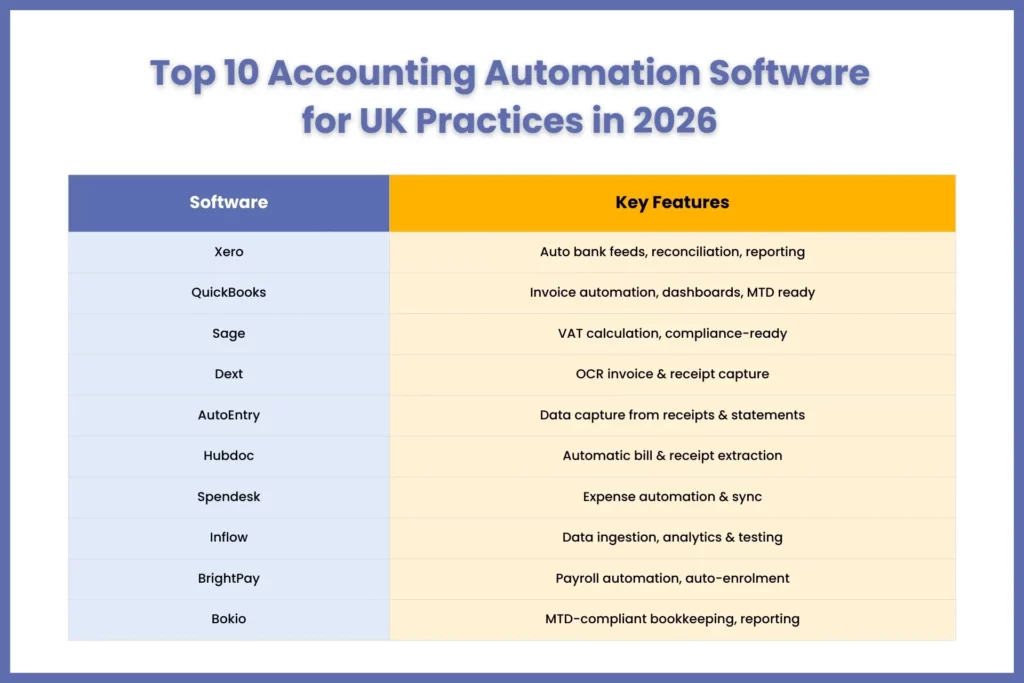
The top 10 accounting automation software solutions for UK practices in 2026 are Xero, QuickBooks Online, Sage Business Cloud Accounting, Dext, AutoEntry, Hubdoc, Spendesk, Inflow, BrightPay and Bokio. The first three are full accounting platforms; the rest add specialist automation for document capture, spend, audit, payroll or bookkeeping.
Large practices typically pair a core ledger (Xero, QuickBooks Online or Sage) with a capture tool such as Dext, AutoEntry or Hubdoc.
| SL. NO. | Software | Main automation function | Best used for |
| 1 | Xero | Bank feeds, categorisation, reconciliation, real-time reporting | Core client ledger |
| 2 | QuickBooks Online | Expense categorisation, invoice automation, dashboards | Core client ledger |
| 3 | Sage Business Cloud Accounting | VAT calculations, bank reconciliation, real-time reporting | Core ledger for medium-sized clients |
| 4 | Dext | Data extraction from receipts and invoices | Document capture |
| 5 | AutoEntry | OCR and machine-learning capture from receipts, invoices, statements | Document capture |
| 6 | Hubdoc | Bill and receipt capture, storage, accounting sync | Document capture and storage |
| 7 | Spendesk | Expense and spend management with automatic syncing | Spend control |
| 8 | Inflow | Data ingestion, sampling, analytics and testing for audit | Audit automation |
| 9 | BrightPay | Bulk payroll, auto-enrolment, payslip distribution, reporting | Payroll automation |
| 10 | Bokio | Invoicing, reports and VAT return submission | Small business clients |
1. Xero
Xero is one of the most trusted and favoured accounting platforms by UK accounting practices. The reasons are its features:
- Automated bank feeds
- Transaction categorisation
- Automated reconciliation
- Real-time financial reporting
Xero works well with multiple automation tools and systems, making it highly adaptable for practices.
2. QuickBooks Online
QuickBooks Online is widely preferred not only by accounting practices but also by small businesses.
The reason for this preference is its features, such as:
- Automated expense categorisation
- Invoice automation
- Financial reporting dashboards
- Bank feed integration
Like Xero, it meets HMRC’s MTD requirements, making it future-ready, including MTD for Income Tax, which became mandatory from 6 April 2026 for qualifying income above £50,000.
3. Sage Business Cloud Accounting
Trusted by accounting practices in the UK for its unique capabilities, such as:
- Automated VAT calculations
- Real-time reporting
- Bank reconciliation automation
- Compliance-ready financial data
Sage is widely used by medium-sized businesses and practices of all sizes.
4. Dext
Dext software focuses on automating the extraction of financial information from receipts and invoices and adding them to the accounting systems automatically.
Dext also offers to handle:
- Day-to-day bookkeeping tasks, from data entry to categorisation and reconciliation
- Integrates seamlessly with accounting software and banks
- Retains scans of all original documents
This way, it reduces the need for manual data entry significantly.
5. AutoEntry
AutoEntry is another software that automatically grabs data from receipts, invoices, statements, and other financial documents,
This tool will:
- Eliminate the need for manual data entry
- Accuracy is maintained through proprietary optical character recognition and machine learning artificial intelligence technology
- In synch with the latest directives like UK’s Making Tax Digital
Thus, saving time and effort. It also integrates seamlessly with HMRC-compliant software such as Xero and QuickBooks.
6. Hubdoc
Say goodbye to data entry by adopting Hubdoc. This tool does the data entry by reading key information from bills and receipts and turning it into usable data.
This tool will also:
- Store the bills and receipts digitally
- Sync with your accounting system
- Use it to forward invoices from your inbox
7. Spendesk
Through Spendesk, you will get:
- Manage your entire spend flow in one unified platform
- Integrates with your tech and financial stack for an even more streamlined workflow
Spendesk focuses on expense management automation. It allows practices to manage spending while automatically syncing transactions with accounting software.
8. Inflow
Built for practices of all sizes, Inflow offers:
- AI-powered risk analysis and deep data insights
- Eliminates manual work, enhances team collaboration
- Unlock efficiency to take on more clients
This software automates data ingestion, samples, analytics, and testing, thus freeing auditors for risk assessment and higher-quality decisions.
9. BrightPay
BrightPay software is:
- Real-time, multi-user platform
- Fully compliant with GDPR and payroll legislation
- Automatically updated and scalable
Use this software, and you can automate your payroll services and make bulk processing, auto-enrolment, payslip distribution, and reporting much faster and far more reliable.
10. Bokio
Bokio has made bookkeeping simple for practices and especially for small businesses.
This software is:
- MTD-compliant by allowing submission of VAT Return to HMRC in just a few clicks
- Create and send invoices on the go
- Provides all the up-to-date accounting reports you need to take control
Try out these accounting software and tools, or even better, get access to these tools and experts who know how to operate through professional outsourcing firms offering bookkeeping outsourcing services. Corient also offers AI tools such as Billy (invoice AI) and Corby X (reconciliation AI) alongside its accounting teams, as part of its wider accounting outsourcing services.
How Does Accounting Automation Software Help UK Practices Stay MTD-Compliant?
Accounting automation software keeps UK practices MTD-compliant by maintaining digital records, automating VAT calculations and submitting returns to HMRC through recognised software. MTD for Income Tax became mandatory on 6 April 2026 for sole traders and landlords with qualifying income above £50,000, according to HMRC.
HMRC has already made Making Tax Digital applicable to VAT, meaning all the VAT documents must be in digital format and VAT return filings must be done through an MTD-compatible software within the deadline. Since 6 April 2026, the same digital-records rules apply to Income Tax for higher-income sole traders and landlords.
The software will support you in:
- Maintaining accurate digital financial records
- Automating VAT calculations
- Generating VAT reports
- Enabling digital submission to HMRC
These features reduce the risk of errors and missed deadlines.
MTD for Income Tax: who must join and when
| Qualifying income tax year | Income threshold | Must join MTD from |
| 2024–25 | Over £50,000 | 6 April 2026 |
| 2025–26 | Over £30,000 | 6 April 2027 |
| 2026–27 | Over £20,000 (planned, subject to legislation) | 6 April 2028 |
Source: HMRC, GOV.UK. HMRC will not apply penalty points for late quarterly updates in the first tax year (2026 to 2027), per its sign-up guidance.
For practices managing many MTD ITSA clients, automation makes quarterly updates manageable at scale. Corient’s Making Tax Digital services support practices through this transition. Read more in our MTD for Income Tax changes guide.
How Do You Choose the Right Accounting Automation Software for a Large UK Practice?
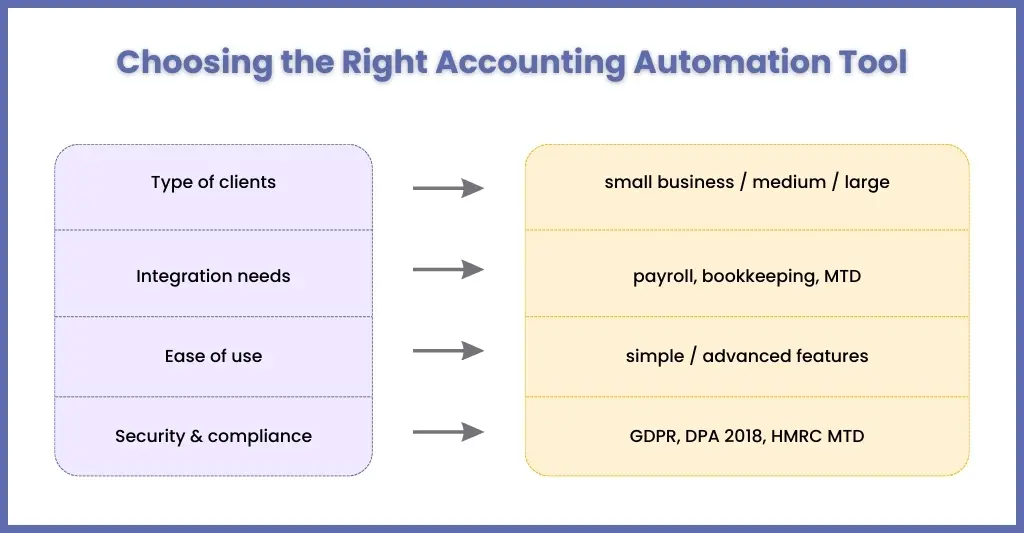
Choose accounting automation software by testing six factors: client mix, integration with your existing systems, ease of use, data security and compliance, scalability, and vendor support. Large practices should weight integration, security and scalability most heavily.
Type of Clients You Serve
Small business clients and large corporate clients have different automation needs. Map your client profiles by scale, data volume and complexity before you shortlist tools.
Level of Seamless Integration With Your Existing System
Automation only works when the entire tech stack works together. When a tool does not integrate with your bookkeeping and payroll system, it will create more problems. Therefore, search for a platform that integrates well with your systems.
Easy to Learn for Your Accounting Staff
If the tool you select is too complicated, then your staff members will have a difficult time understanding and operating it, leading to errors and a slowdown of the accounting process. Hence, it’s wise to get an accounting automation software that is simple to operate and understand.
Data Security and Compliance
Cyber risks are at an all-time high, and regulators are expecting you to tighten data security. Therefore, invest in a software that has the highest level of data encryption, access controls, backup processes, and certifications. Make sure the software is compliant with UK GDPR, Data Protection Act 2018, and other UK-specific requirements around data handling. Large practices should also look for ISO 27001 certification, role-based access and full audit trails. Also, getting assistance in GDPR implementation from an outsourcing accounting firm will help you further.
Scaling Up
Your accounting firm will surely expand in the coming years, and you will need software that is capable of growing with you, like offering more services, more integrations and more automation capacity. Avoid software that is incapable of meeting your future accounting and compliance needs.
Availability of Support and Training
It’s not the end when you have installed an automation software; it must be used properly to get the maximum benefit out of it. For that, you will need strong customer support, onboarding assistance, and access to training material. It can make the difference between a tool you fully adopt and one that ends up half-used.
What Are the Most Common Questions About Accounting Automation Software?
Is accounting automation software MTD-compliant in the UK?
It can be, provided it is HMRC-recognised or integrates with recognised software. Platforms such as Xero, QuickBooks Online and Sage support digital record-keeping and VAT return submission under Making Tax Digital, while capture tools like Dext and AutoEntry feed data into them. Always check HMRC’s current recognised-software list before committing.
What is the difference between accounting software and accounting automation software?
Traditional accounting software records and reports financial transactions. Accounting automation software goes further by capturing data automatically, categorising transactions, reconciling bank feeds, chasing documents and generating reports with minimal manual input. For large practices, the practical difference is capacity: the same team can process more client files with fewer errors and faster turnaround.
What tasks can accounting automation software handle?
It can handle invoice processing, receipt capture, bank reconciliation, transaction categorisation, expense management, VAT preparation and financial reporting. These are repetitive, rules-based tasks, so automation cuts manual bookkeeping effort and errors. Judgement-led work, such as tax planning, complex adjustments and client advisory, still needs qualified accountants.
Is Xero approved by HMRC?
Yes. Xero is recognised by HMRC as software compatible with Making Tax Digital for VAT and Income Tax, and it is also listed as HMRC-recognised payroll software. Practices should still confirm current status on HMRC’s recognised-software list before onboarding clients, because products are added to and withdrawn from those lists over time.
Will AI replace bookkeepers?
No. AI and automation take over repetitive admin such as data entry and reconciliation, but bookkeepers remain essential for review, exception handling, client communication and compliance judgement. ACCA’s research describes AI as a tool that enhances accountants’ skills rather than replacing them, shifting effort towards analysis, interpretation and advice.
Which accounting automation software is best for large practices?
There is no single best option. Large practices usually combine a core ledger such as Xero, QuickBooks Online or Sage with capture tools like Dext, AutoEntry or Hubdoc, then add workflow, security and reporting controls. Prioritise integration, audit trails and scalability, and pilot with a small client group before rolling out firm-wide.
Final Thoughts: Choosing the Right Accounting Automation Approach for Your UK Practice
Corient helps UK practices implement accounting automation by pairing its AI Crew tools with experienced accounting professionals. Corient Business Solutions supports UK accountancy firms with outsourced bookkeeping, payroll, year-end accounts, management accounts and tax services.
Accounting automation is the future of accounting, and most accounting practices recognise that. With increasing compliance requirements from HMRC, growing transaction volumes, and staffing challenges, automation helps you operate more efficiently.
To get the maximum benefit out of it, you will need the expertise in operating these tools, which is offered by professional outsourcing firms like Corient. By combining automation technology with experienced accounting professionals, Corient helps practices:
- Reduce operational pressure
- Manage your growing client portfolios
- Maintain compliance with the latest UK regulations
- Deliver faster and more accurate financial reporting
Corient’s Director of Operations and New Business, Sachin Lohade, has more than 19 years’ experience with firms including BDO International, PricewaterhouseCoopers and Serco, across payroll, finance and accounting projects.
To discuss automation for your practice, contact the Corient team.