
To register for Self-Assessment, a client completes the online registration on GOV.UK (form CWF1 if self-employed, SA1 if not), signs in with a Government Gateway account, and waits for HMRC to post a Unique Taxpayer Reference. Register by 5 October after the tax year in which they first need to file.
Key Takeaways
- Deadline: Your client needs to register with HMRC by 5 October following the end of the tax year in which they first need to file. For 2025–26 income, that date was 5 October 2026. For 2026–27 income, it will be 5 October 2027.
- Forms: Self-employed clients use CWF1. Everyone else who needs to file uses SA1, and partners use SA401.
- UTR: HMRC normally posts the Unique Taxpayer Reference within 10 working days, or 21 if the client is living abroad. Nothing can be filed until it arrives, so it’s worth registering early.
- Volume: By 31 January 2026, HMRC had received 11,489,825 of the 12,029,168 returns it expected for 2024–25. Peak periods get very busy, so leaving things late carries real risk.
- New in 2026: Making Tax Digital for Income Tax has applied since 6 April 2026 to sole traders and landlords with qualifying income above £50,000. That threshold drops to £30,000 from April 2027.
What does it mean to register for Self-Assessment?
Registering for Self-Assessment means telling HMRC that a client has income that isn’t fully taxed at source and needs to file a tax return. HMRC then issues a Unique Taxpayer Reference (UTR), a 10-digit number, and the client can’t file without it.
This applies to self-employed individuals, landlords, company directors, partners in a partnership, and anyone earning additional untaxed income.
The registration process itself involves submitting the correct and complete form, CWF1 for the self-employed or SA1 for individuals with other types of untaxed income, and setting up a Government Gateway account. It has to be done by 5 October after the end of the tax year in which the client first needs to file. For 2025–26 income, that date was 5 October 2026. For 2026–27 it’s 5 October 2027.
Each registration is quick. The pressure comes from volume. HMRC expected 12,029,168 Self Assessment returns for 2024–25 and had received 11,489,825 by the 31 January 2026 deadline; 97.25% were filed online and 475,722 people waited until deadline day itself (HMRC, 3 February 2026). Any practice onboarding clients in bulk will feel that pressure in October and again in January.
Below we cover who needs to register, how to do it, what late registration costs, and what changed in 2026.
Who needs to register for Self-Assessment?
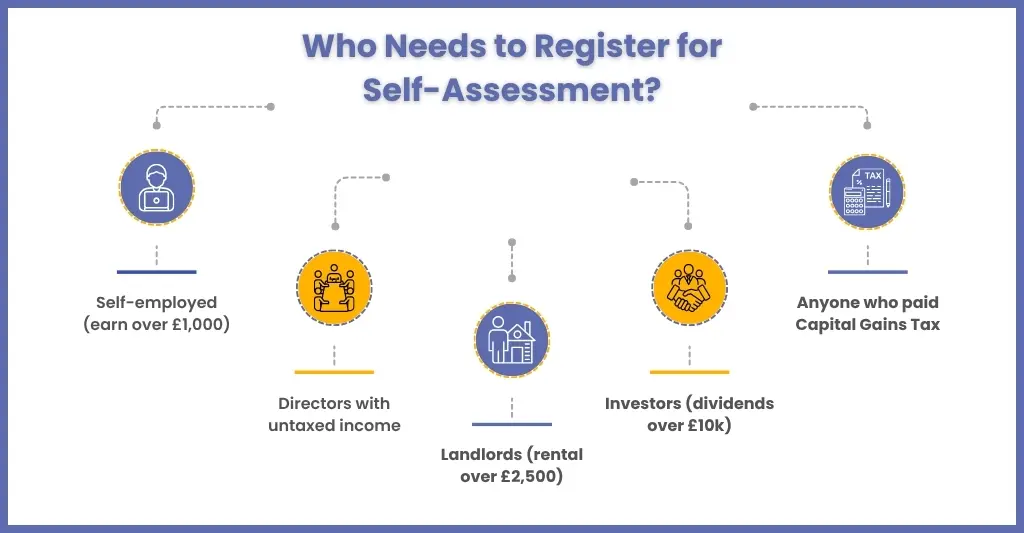
A client needs to register if they have income HMRC doesn’t collect through PAYE and they aren’t already in Self Assessment. Check every new client against the list below at onboarding, not in January.
As an accounting practice, it is your responsibility to determine which of your clients’ need to register for a self-assessment tax return. As per the regulations set by HMRC, many are required to do a self-assessment and complete personal tax returns for HMRC, including:
- Self-employed sole traders who earn more than £1,000 in a year
- Limited company directors who receive untaxed income
- Individuals receiving more than £10,000 from savings and investments or more than £10,000 from share dividends
- Receive rental income over £2,500 after expenses
- Individuals who had to pay capital gains tax when they sold or ‘disposed of’ something that increased in value
Step-by-Step Process: How to Register for Self-Assessment with HMRC
There is a process to follow for registering for a self-assessment tax return with HMRC. Let’s go through the process step by step.
Step 1: Choose the Correct Form
Self-employed clients must fill out the CWF1 form. The SA1 form is for clients who are not self-employed but need to file (e.g., landlords). For clients in a partnership, they must complete the SA401.
Step 2: Set Up a Government Gateway Account
Register via the HMRC website and enter your client’s details such as :
- Name
- National Insurance number
- Date of birth
- Home address
- Telephone number and email address
- The reason you need to register
- Business name
- Business address
Once registered, you will receive a Unique Taxpayer Reference (UTR) by post in 10–15 working days.
Step 3: Log In
After receiving the UTR number, your client can log in to the Government Gateway and file their self-assessment. This process ensures your clients are correctly linked and ready to file digitally via MTD-compatible software.
How do you register for Self-Assessment online?
Sign in with a Government Gateway account on GOV.UK, choose the correct form for the client, submit their details, then activate the service when HMRC’s UTR and activation code arrive by post. Allow about 10 working days.
Which form should you use?
| Client type | Form | Notes |
| Self-employed (sole traders) | CWF1 | Registers the client for Self Assessment as self-employed. |
| Not self-employed but must file (landlords, investors, others) | SA1 | Used for rental, investment and other untaxed income. |
| Partner in a partnership | SA401 | Each partner needs their own UTR. |
The wrong form is one of the most common reasons a UTR is delayed, so confirm the client’s situation before you submit.
Step 1: Create or Access a Government Gateway Account
To begin with, log into or create the client’s Government Gateway user ID. If your client doesn’t yet have access, you’ll need to set up their sign-in credentials through HMRC’s online portal.
Step 2: Choose the Correct Registration Form
Depending on the client’s circumstances:
- Self-employed clients (sole traders or partners) should complete form CWF1.
- Clients who are not self-employed but need to file (for example, landlords, investors) should use form SA1.
- Selecting the wrong form can lead to delays in UTR issuance.
Step 3: Submit Registration Details
Complete the online registration with accurate client information: full name, National Insurance number, date of birth, address, email address, and reason for registration (e.g., self-employment from a specific date, rental income).
Once submitted, the client usually receives their UTR by post within approximately 10 to 15 working days.
Step 4: Wait for the UTR and activation code
HMRC usually posts the UTR within 10 working days, or 21 days if the client is abroad. The activation code for the online service arrives separately. If a client has lost an existing UTR, HMRC explains how to find it.
Step 5: Activate the Self-Assessment Service
When the UTR and activation code arrive, help your client activate the Self-Assessment service in their Government Gateway account. Without this step, they cannot file online. Once active, the client can file, and your practice can link them to your authorised agent access.
Step 6: Confirm Registration Before the Deadline
Ensure the registration is completed by 5 October following the end of the tax year in which the client became chargeable. Once the UTR is active and linked, the client is set to file by the following 31 January.
What happens if a client registers for Self-Assessment late?
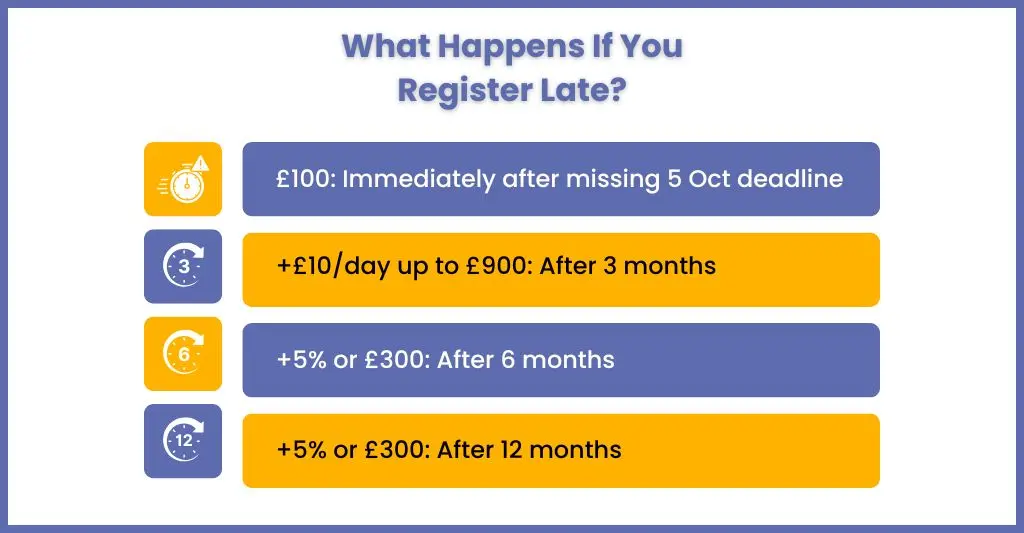
Missing 5 October can lead to a failure-to-notify penalty. That penalty is a percentage of any tax that ends up paid late because HMRC wasn’t told in time, so a client who registers late but still files and pays by 31 January normally has little or nothing to penalise. The higher costs come from filing late.
The penalties for a late return (the 2024–25 return was due 31 January 2026) apply on top and run as follows (GOV.UK penalties guidance):
| When | Penalty |
| Day after the deadline | £100 fixed penalty, even if no tax is owed |
| After 3 months | £10 a day, up to a maximum of £900 |
| After 6 months | A further 5% of the tax due, or £300, whichever is greater |
| After 12 months | Another 5% of the tax due, or £300, whichever is greater |
As an accounting practice handling your clients’ accounts, you must keep track of your clients’ timelines and send proactive reminders to avoid these penalties.
What are the Self-Assessment deadlines for the 2025–26 tax year?
Online returns and the tax owed for 2025–26 are due by 31 January 2027. First-time filers had until 5 October 2026 to register. Your clients need to know that there are multiple deadlines associated with the tax return.
Here is list of deadlines for registration for self-assessment and the submission and payment of tax:
| Task | Deadline |
| Registration for Self-Assessment (first return for 2025–26) | 5 October 2026 (passed) |
| Registration for Self-Assessment (first return for 2026–27) | 5 October 2027 |
| Submission of paper tax return | 31 October 2026 |
| Online return if the client wants tax collected through their PAYE code | 30 December 2026 |
| Submission of online tax return | 31 January 2027 |
| Paying tax owed (first payment) | 31 January 2027 |
| Pay second payment on account | 31 July 2027 |
Why UK Accountants Trust Us with Self-Assessment Registration Support
At Corient, we understand that time and accuracy are crucial during the Self-Assessment period, and clients rely on your support in maintaining these standards. However, with vast volumes of self-assessment tax returns, giving such support to each client is impossible. That’s why practices approach us for accounting outsourcing services, including managing time-consuming self-assessment registrations and other tasks.
Here’s how we will provide you vital support:
1. Managing Form Submissions
Our accountants are experienced enough to handle all types of clients and their forms, including:
- CWF1 for self-employed clients and sole traders
- SA1 for landlords, investors, and individuals with untaxed income
- SA401 for partnership members
By handling these forms end-to-end, we eliminate errors, avoid rejections, and save your team valuable hours.
2. UTR Tracking and Status Updates
Getting a Unique Taxpayer Reference (UTR) from HMRC can be a bottleneck. To overcome these delays, we will implement continuous monitoring and proactively address any delays. If any issues arise, we will notify you so that there are no unwarranted surprises.
3. Assistance in Government Gateway Onboarding
We will also assist your clients in:
- Creating secure Government Gateway accounts
- Linking their UTR for Self-Assessment
- Adding the relevant services and ensuring full HMRC access
Such assistance is essential for MTD compliance and seamless online filing, and we ensure it’s done right the first time.
4. Thorough Verification and Support
Additionally, our experts are well-versed in HMRC’s identity verification protocols, ensuring your clients submit the correct documents in advance for a smooth verification process. This helps avoid unnecessary back-and-forth and prevents client confusion.
5. Other Advantages
By outsourcing self-assessment registration to Corient, we will help you in:
- Freeing up your accountants to focus on advisory, forecasting, and planning
- Reducing internal workload
- Improving client onboarding speed and satisfaction
Our experts will ensure timely and accurate registration, enabling your practice to perform better.
Help Your Clients Register for Self-Assessment the Right Way With Expert Support
Handling clients’ registrations for self-assessment tax returns is a time and resource-consuming exercise, especially during peak tax periods. For this reason, accounting practices are choosing outsourcing partners like Corient, which are experts in clients’ registrations.
By collaborating with us, your clients will enjoy the following benefits.
Dedicated Team
Furthermore, a dedicated team will be assigned to you, comprising experts in Self-Assessment onboarding who understand HMRC forms and registration rules in detail. They will work closely with your team to ensure seamless coordination and prevent any issues.
Get Free Trial
You can be extra sure about us by taking a free trial and experiencing our:
- Real-time response handling
- The speed of our form processing
Our risk-free trial will provide you with complete transparency into our working style and how our support will integrate with your workflows. Additionally, you will gain insight into how much time and money you will save for yourself and your clients.
Full Compliance with HMRC, GDPR, and ISO 27001
Security and regulatory compliance are non-negotiable. That’s why Corient’s infrastructure and workflows ensure:
- End-to-end encryption (AES 256-bit) of all data
- GDPR-compliant processes for UK data handling
- ISO 27001-certified systems to protect client confidentiality and traceability
Your clients’ sensitive financial data is protected to the highest global standards.
Frequently Asked Questions(FAQ)
1. How long does it take to get a UTR number?
It typically takes 10 to 15 working days for HMRC to send the UTR number by post. Clients should wait for this before attempting to file their Self-Assessment return.
2. Can I outsource Self Assessment registration for my practice?
In fact, many accounting firms now outsource this task to specialised partners like Corient, who manage form submissions, UTR tracking, and Gateway setup—freeing your team to focus on advisory work.
3. What is the deadline to pay self-assessment tax?
The deadline for paying the self-assessment tax is 31st January and the second payment is on 31st July.
4. What should a client do if they forget their Government Gateway login?
Use the ‘Forgot user ID’ or ‘Forgot password’ link on the HMRC sign-in page. HMRC sends the ID to the registered email, and a password reset needs the user ID plus a code sent to the linked phone or app. If the client can’t reach either, HMRC will ask identity questions, such as a National Insurance number or passport details.
5. What is a UTR?
A Unique Taxpayer Reference, or UTR, is a 10-digit number HMRC uses to identify a person or business for Self-Assessment. It’s issued once, by post, after registration and stays with the taxpayer for good. Clients need it to file a return, and practices need it to link a client to their agent access.
Conclusion
Helping clients register for Self-Assessment tax return is more than just ticking a box; it’s about safeguarding them from penalties and ensuring your practice runs smoothly during tax season. Moreover, with HMRC increasing digital compliance and tightening deadlines, your clients will rely on your practice for even more support. However, we have noticed that practices are faltering simply because of the high volume of assessments being placed on them. Such an excess load of self-assessments can be handled by partnering with an outsourcing firm.
When it comes to outsourcing self-assessments, you will find Corient’s name among the top listers. As a result, we have achieved this position by investing in our talent and processes, ensuring you receive up-to-date Self-Assessment services. With our experts on your side, you won’t have to worry daily about client registrations, filings, or deadlines. Are you considering getting a free trial? Great, but first, connect with us through our contact form and gain access to our experts.