

A business tax account is HMRC’s online service that lets sole traders, partnerships and limited companies manage taxes such as VAT, PAYE, Corporation Tax and Self Assessment in one place. It covers over 40 taxes. Accountants act through HMRC agent authorisation for each client, not by using the client’s own login.
Handling a business tax account is one of the most important responsibilities that businesses and, increasingly, accounting practices are handling on their behalf. For large practices, one missed alert or unlinked service across a client portfolio can mean missed deadlines and penalties.
This guide explains how a business tax account works, how to set it up, how agent authorisation works and how Making Tax Digital fits in.
Key Takeaways
- A business tax account is HMRC’s online service for managing VAT, PAYE, Corporation Tax, Self Assessment and over 40 taxes in one place (GOV.UK, updated 10 April 2026).
- Practices must be authorised by each client for each tax and sign in through their own HMRC agent account, not the client’s credentials.
- Online Agent Authorisation sends a code to the client within 7 working days; the client has 30 days to pass it on. It has not covered VAT since 16 February 2024.
- MTD for Income Tax became mandatory on 6 April 2026 above £50,000 of qualifying income, falling to £30,000 from April 2027.
- Corient supports UK accounting practices with tax filings, HMRC compliance, VAT submissions and payroll tax obligations.
What is a Business Tax Account?
A business tax account is HMRC’s online service that individuals, sole traders, partnerships and limited companies can use to manage taxes such as VAT, PAYE, corporation tax, and Self-Assessment in one place, across more than 40 taxes in total. Consider it as a central dashboard for all business tax activities.
Using a business tax account, your clients can:
- Make returns and payments for the taxes they are registered for
- Manage PAYE payroll obligations
- Review the corporation tax details
- View payment history
- Track tax liabilities
- Update business details
- Check secure messages from HMRC
- Add or change a tax agent
- Give team members access to a tax
This system is designed to simplify tax management for businesses while supporting HMRC’s transition toward fully digital tax reporting. As the UK government continues expanding Making Tax Digital, the business tax account will play an even bigger role in managing compliance.
Key figures for practices
| Source and date | Finding | Link |
| GOV.UK, business tax account guidance (updated 10 April 2026) | The account can be used to check tax position for over 40 taxes, including Self Assessment, VAT, PAYE and Corporation Tax. | HMRC guidance |
| GOV.UK, Online Agent Authorisation (page updated 18 January 2024) | HMRC posts an authorisation code to the client within 7 working days; the client has 30 days to pass it to the agent. | HMRC guidance |
| GOV.UK, MTD for Income Tax (checked 6 October 2026) | Mandatory from 6 April 2026 for qualifying income over £50,000 and from 6 April 2027 for income over £30,000. | HMRC guidance |
What Can You Manage Through an HMRC Business Tax Account?
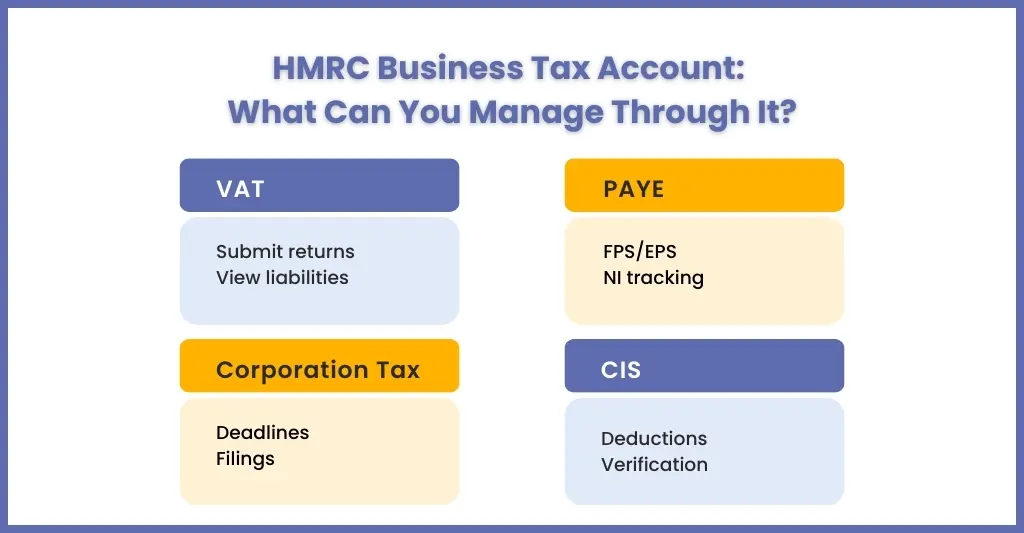
You can manage VAT, PAYE for employers, Corporation Tax, Self Assessment, the Construction Industry Scheme and Making Tax Digital services, plus secure messages, payments and agent access, all from one sign-in.
Business Tax Account acts like a control panel through which your clients can manage multiple tax services.
VAT
Those businesses registered for VAT can:
- File VAT returns through MTD-compatible software; see our guide to filing and paying VAT online
- View VAT liabilities
- Check payment history
- Register for Making Tax Digital for VAT
- Manage VAT certificates and correspondence
PAYE for Employers
For clients, employing staff can manage payroll tax obligations, such as:
- Review payroll information (FPS/EPS) submitted through payroll software
- View employer liabilities
- Manage PAYE and National Insurance
- Check tax code notices for employees
Corient manages payroll tax obligations for UK practices through its payroll outsourcing service.
Corporation Tax
Limited companies can use the tax account to:
- View corporation tax records
- Track corporation tax payment deadlines
- Submit tax filings
Self Assessment, Including Partnerships and Trusts
Partnership businesses can manage tax obligations and submit self-assessment tax returns digitally.
Construction Industry Scheme (CIS)
Construction businesses can handle:
- Contractor registrations
- CIS deductions
- Payment verification
How Do You Register for a Business Tax Account with HMRC?
Register by creating Government Gateway sign-in details for an organisation, then add each tax, such as VAT, PAYE or Corporation Tax, to the account. For some taxes HMRC posts an activation code to the business address, which must be entered to finish setup. See HMRC’s registration guidance.
In order to use a business tax account, you will need to register with HMRC. Here is a step-by-step guide to help your clients set up their accounts.
1. Prepare Information
Before your client sets out to open their account, make sure they have all the required information, such as:
- Their Government Gateway User ID and password, if not, then create one during the process.
- Business details, including the Unique Taxpayer Reference (UTR) number if your client is a sole trader or a limited company.
- National Insurance number for sole traders
- Company registration number, if applicable
- VAT registration number, if applicable
2. Create a Government Gateway account
To create a government gateway account, your client will first need to go to the HMRC website and do the following:
- Click on “Create sign-in details.”
- Provide your client’s email address, and the client will receive a confirmation code
- Enter the code, then create a password and a recovery word
- The Government Gateway user ID will be sent
3. Register for HMRC Online Services
Once logged in, your client will need to select the appropriate service, such as self-assessment, corporation tax, PAYE for employers or VAT. Your client will need to follow the instructions to register their business for the chosen service, and they will have to enter their business details.
4. Activate your account
Once your client gets the activation code by post it can log into their HMRC account using their Government Gateway ID. Enter the code to complete the setup, and now your client will have access to their tax account and the specific service they have registered for.
5. Link Additional Services (if needed)
If your client needs additional services then it can add them through the account by selecting the service from the menu and following the registration process.
6. Manage the Account
Now your client can manage its taxes, submit returns and view their account details through the HMRC online portal. Your practice must be authorised by the client for each tax before you can act for them. You request authorisation from your own HMRC agent account; for many services HMRC then posts a code to the client within 7 working days, and the client has 30 days to give it to you. See HMRC’s agent authorisation guidance.
What Is the Difference Between a Business Tax Account and a Personal Tax Account?
A business tax account manages the taxes of a business, such as VAT, PAYE, Corporation Tax, CIS and Self Assessment, while a personal tax account manages an individual’s own tax affairs, such as an Income Tax estimate or tax code.
Many of your clients get confused between a business tax account and a personal tax account. Both are important but serve different purposes.
| Feature | Business Tax Account | Personal Tax Account |
| Used by | Businesses | Individuals |
| Taxes managed | VAT, PAYE, Corporation Tax, CIS, Self Assessment (sole traders and partnerships) | Income tax, self-assessment |
| Login | Government Gateway | Government Gateway |
| Purpose | Manage company taxes | Manage personal taxes |
A tax account is essential for managing corporate and employer tax responsibilities.
How Do You Log In to an HMRC Business Tax Account and Fix Common Problems?
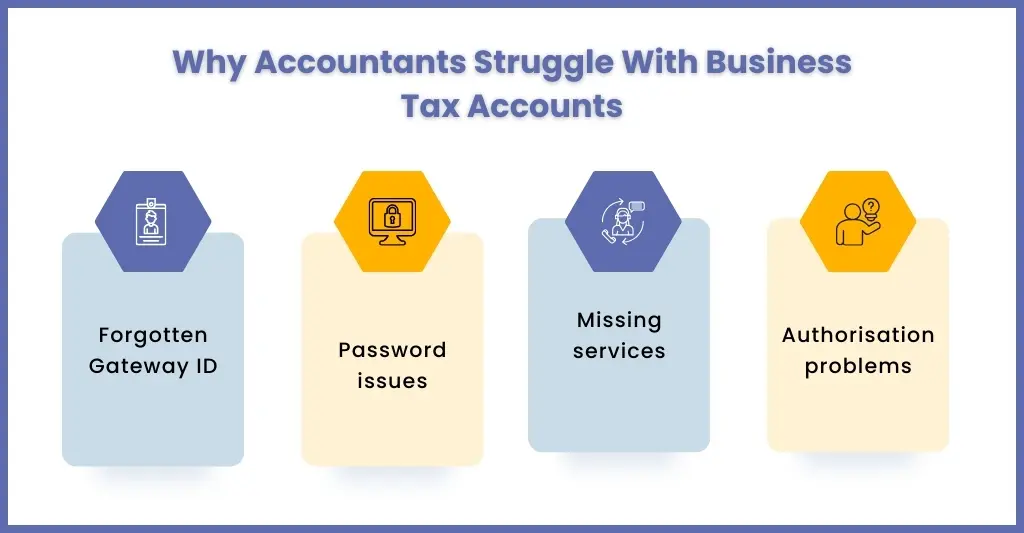
Sign in through GOV.UK with the Government Gateway details used when the first business tax was registered. If services are missing or access fails, check that each tax has been added and that agent authorisation is complete for that tax.
For your client to access their business tax account it must log in through the HMRC portal using their Government Gateway credentials. Agents do not use the client’s login: they sign in to their own HMRC online services for agents account.
However, login issues are common. Some of those issues are:
Forgotten Government Gateway ID
Loss of login ID is a common issue and HMRC allows recovery of it using email verification.
Incorrect Password
Password errors keep happening very often and users can reset their passwords through HMRC password recovery process.
Missing Services in the Dashboard
Sometimes tax services don’t appear automatically. This usually happens when services were not linked during registration. Users must manually add them within the account.
Authorisation Issues
Sometimes, even after authorisation, accountants are unable to see their client’s data. Check that the client has signed up to the tax service, that authorisation was requested for that specific service, and that the code was entered within 30 days. Each tax service has its own code.
How Does a Business Tax Account Work with Making Tax Digital in 2026?
The business tax account is where Making Tax Digital for VAT and Making Tax Digital for Income Tax services are accessed, while digital records and returns are kept in MTD-compatible software. MTD for Income Tax became mandatory on 6 April 2026 for qualifying income above £50,000.
The business tax account is closely linked with HMRC’s Making Tax Digital initiative.
The MTD initiative has made it compulsory for your clients to:
- Maintain their records in digital format
- Submit tax returns through approved software
- Maintain accurate financial data
The tax account acts as the central portal connecting businesses with MTD-compliant software. Currently, all VAT registered UK businesses have to submit their VAT returns using MTD-compatible systems. Since 6 April 2026, MTD’s digital reporting requirements also apply to income tax for higher earners. For the 2026 position on corporation tax, see our guide to MTD for Corporation Tax.
MTD for Income Tax: who must join and when
| Qualifying income tax year | Income threshold | Must join MTD from |
| 2024–25 | Over £50,000 | 6 April 2026 |
| 2025–26 | Over £30,000 | 6 April 2027 |
| 2026–27 | Over £20,000 (planned, subject to legislation) | 6 April 2028 |
Source: HMRC, GOV.UK, checked 6 October 2026.
Here, your role becomes critical in guiding your clients towards MTD compliance and operating their business tax accounts. Corient’s Making Tax Digital services support practices through this transition.
What Happens to a Business Tax Account When You Close Your Business?
A business tax account does not close automatically when a business stops trading. The business must notify HMRC, file final returns, pay outstanding liabilities and then have the relevant taxes deactivated.
Once your client stops its business, the business tax account will not go away automatically. You will need to follow several steps for it to close down.
Notify HMRC
Start by informing the HMRC of your client’s business closure.
Submission of Final VAT Returns
Once the HMRC get the closure information, it will look at your client account for any pending VAT and corporation tax returns which must be submitted before the account is closed.
Payment of Outstanding Liabilities
All outstanding liabilities must be paid by your client promptly, and only after that HMRC will initiate the closing of the business account.
Deactivation of the Account
Once all the payments are made, HMRC makes the update on the business tax account and starts the procedure to deactivate.
What Do People Ask About the HMRC Business Tax Account?
What is a business tax account?
A business tax account is HMRC’s online service for sole traders, partnerships and limited companies to manage business taxes in one place. HMRC says it covers over 40 taxes, including VAT, PAYE, Corporation Tax and Self Assessment. Users can check their tax position, make returns and payments, read secure messages and give agents or team members access.
How long does it take to set up a Business Tax Account?
Creating Government Gateway sign-in details takes a few minutes online. Adding a tax such as VAT, PAYE or Corporation Tax may need an activation code posted to the business address, which can take several days to arrive. Allow for the post before any filing deadline, and enter the code promptly once it arrives.
What is the difference between a Government Gateway and a Business Tax Account?
A Government Gateway user ID is the sign-in used to access HMRC online services. The business tax account is the dashboard you see after signing in, showing the taxes you have registered for and letting you manage them. Using the same sign-in details you first registered with keeps your registered taxes visible in one account.
Is a Business Tax Account free to use?
Yes. HMRC provides the business tax account without a charge, and businesses only pay the taxes they owe, not for using the portal. Costs can arise if you buy third-party MTD-compatible software or pay an accountant or outsourcing provider to manage filings on your behalf, but access to the HMRC portal itself carries no fee.
What is the difference between a personal tax account and a business tax account?
A personal tax account manages an individual’s own tax affairs, such as checking an Income Tax estimate or tax code. A business tax account handles the tax obligations of an organisation or self-employed business, including VAT, PAYE, Corporation Tax, CIS and Self Assessment. Both sign in through Government Gateway, but they serve different purposes.
How does an accountant get authorised to act for a client with HMRC?
An accountant needs an HMRC agent services account, then requests authorisation for each tax service the client uses. For many services HMRC posts a code to the client within 7 working days, and the client has 30 days to pass it on. Online Agent Authorisation has not been available for VAT since 16 February 2024.
When does Making Tax Digital for Income Tax start?
Making Tax Digital for Income Tax became mandatory on 6 April 2026 for sole traders and landlords with qualifying income over £50,000. The threshold falls to £30,000 from 6 April 2027, and a £20,000 threshold is planned for April 2028. Clients and agents sign up through HMRC services and must use compatible software.
Conclusion
Corient supports UK accounting practices with tax filings, HMRC compliance, VAT submissions and payroll tax obligations, combining experienced accounting professionals with digital systems and AI Crew tools.
The business tax account is the central hub for practices to manage their clients’ business tax obligations. With HMRC actively expanding the digital reporting requirements through Making Tax Digital initiatives many businesses have understood that they need to handle their business tax accounts properly.
However, that’s easier said than done due to the complexities involved, making the assistance of expert accounting practices important. But now even practices are in need of assistance in handling business tax accounts due to the volume of digitisation and added complexities.
For these reasons many practices are relying on experienced outsourcing accounting partners like Corient to manage:
- Tax filings
- HMRC compliance
- VAT submissions
- Payroll tax obligations
- Digital tax reporting
By combining accounting expertise with efficient digital systems, Corient has helped UK accounting practices navigate HMRC requirements with confidence. Explore Corient’s tax outsourcing support.
To streamline compliance across your client portfolio, use our contact form to explain your requirements in detail.
