

Standardising cloud bookkeeping means applying one chart of accounts, one set of VAT codes, and one reconciliation workflow across every client file in Xero, QuickBooks Online, or Sage. It stops duplicate transactions, misclassified entries, and broken audit trails, cutting data clean-up time and keeping practices ready for HMRC’s Making Tax Digital deadlines.
One thing that will impede the smooth functioning of cloud bookkeeping is dirty data. Cloud bookkeeping is being adopted by practices to manage multiple clients, streamline processes, and stay compliant with the latest HMRC requirements. But without standardisation, cloud bookkeeping will become a source of errors.
Take the example of an accounting firm, which had migrated all its clients to Xero’s cloud platform for faster reconciliations and better reporting. However, within weeks, it got a shock:
- Inconsistent chart of accounts across clients
- Duplicated invoices
- Misclassified transactions
The result? Misleading financial statements, wasted hours fixing errors, and stressed staff.
Such scenarios make the standardisation of cloud bookkeeping important. When it’s done right, dirty data is reduced, time is saved, accuracy improves, and compliance is ensured.
In this blog, we’ll explore how standardised cloud bookkeeping can protect practices from dirty data, improve workflow efficiency, and prepare them for 2026 audits.
Key Takeaways
- Standardised cloud bookkeeping = one chart of accounts and one VAT-coding rulebook applied to every client in Xero, QuickBooks Online or Sage.
- Dirty data — duplicate transactions, misclassified items, incomplete reconciliations — is the main driver of audit queries once Making Tax Digital records are checked.
- MTD for Income Tax becomes mandatory from 6 April 2026 for sole traders and landlords with qualifying income over £50,000, dropping to £30,000 in 2027 and £20,000 in 2028 (HMRC, 2026).
- 47% of UK accountants say they are placing their trust in cloud-based software (Wolters Kluwer, Future Ready Accountant Report).
- Corient’s outsourced bookkeeping team standardises client files across Xero, QuickBooks Online and Sage for UK accountancy practices.
What Is Cloud Bookkeeping?
Cloud bookkeeping is the process of managing your clients’ financial transactions online through cloud-based accounting software.
Key points:
- Real-time access to client financial data
- Automated transaction categorisation
- Multi-user access for accountants and clients
- Integrated reporting and dashboards
Accounting practices have long used desktop software such as Sage 50 to record and track client cash flows. Cloud bookkeeping shifts that record-keeping into a browser-based platform — Xero, QuickBooks Online, or Sage Business Cloud are the three most widely used in the UK — giving accountants and clients the same live figures from anywhere.
Why Dirty Data Is a Bigger Risk in Cloud Bookkeeping
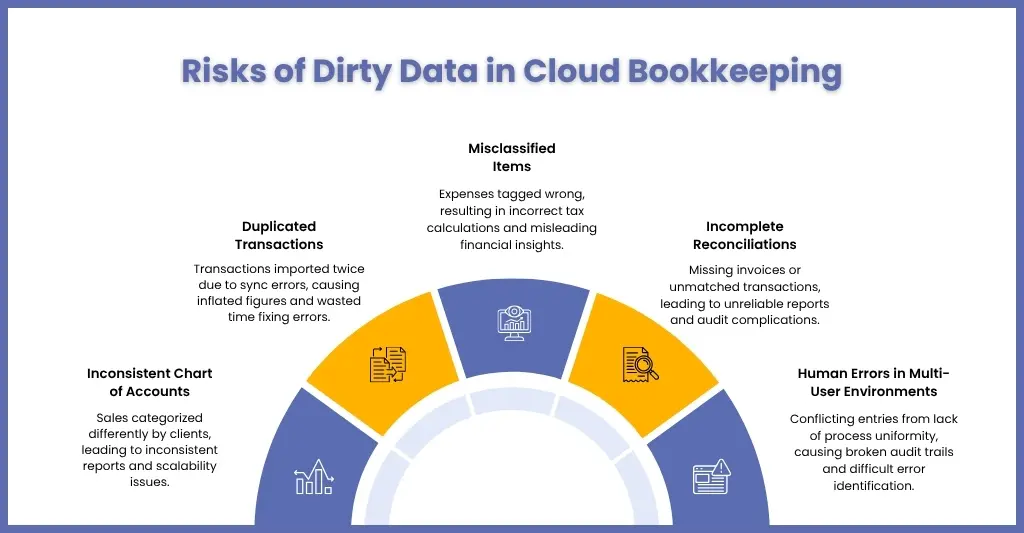
Dirty data is a bigger risk in cloud bookkeeping because cloud platforms process transactions faster, across more users, and through more automated feeds than desktop software did — so a single sync error or misclassification spreads into reports, reconciliations, and HMRC submissions before anyone notices it.
Cloud bookkeeping systems have transformed how practices do bookkeeping by giving them faster access, automation, and real-time collaboration. But there is one thorn in this rosy picture.
Cloud bookkeeping cannot eliminate errors, and it will multiply if not controlled properly.
Why is this happening? Cloud platforms process the data faster across multiple users and at higher volumes. If anything goes wrong, it will spread across reports, reconciliations, and compliance findings.
Inconsistent Chart of Accounts
A chart of accounts is the structured list of categories — such as sales, cost of sales, and overheads — that every transaction in a client’s books gets filed under. An inconsistent chart of accounts happens when each client’s file uses a different structure, so the same transaction type is labelled and reported differently from one client to the next.
For example:
- One client records “Sales” under revenue, another splits it into multiple categories
- The expense classifications vary across businesses
Impact:
- Reports will become inconsistent and hard to compare
- Financial analysis loses accuracy
- Standardisation across your practice becomes impossible
Instead of scalable workflows, you end up with custom chaos for every client.
Duplicate Transactions
Duplicate transactions happen when the same entry is pulled into a client’s file more than once — usually because a bank feed re-imports a transaction, a sync error fires twice, or a manual upload overlaps with an automated feed.
- Transactions are getting imported twice
- Sync errors are creating duplicates
- Manual uploads overlap with automated feeds
Impact:
- Inflated revenue or expenses
- Incorrect bank balances
- Time wasted identifying and removing duplicates
Misclassified Items
Misclassified items occur when automated categorisation in Xero, QuickBooks Online or Sage tags a transaction to the wrong account or the wrong VAT treatment, and no one reviews the suggestion before it’s posted.
- Expenses may be incorrectly tagged
- Revenue may be allocated to the wrong accounts
- VAT treatments may be applied incorrectly
Impact:
- Wrong profit and loss statements
- Incorrect tax calculations
- Misleading business insights for clients
Over time, these small classification errors will create big reporting inaccuracies.
Incomplete Reconciliations
An incomplete reconciliation is a bank or credit card statement that has been partially matched against the books but never fully closed off, usually because a receipt, invoice, or bank line is still missing.
- Missing invoices or receipts
- Unmatched bank transactions
- Partial reconciliations left unfinished
Impact:
- Books will not match bank balances
- Unreliable financial reports
- Increased audit queries
Human Errors in a Multi-User Environment
Human error increases whenever more than one person can edit the same client file, because accountants, bookkeepers, and clients each follow slightly different habits for entering and approving transactions. The same risk applies downstream in payroll: Moorepay’s guidance on payroll data accuracy makes the same point about clean source data feeding clean payroll journals.
- Duplicate or overwritten entries
- And a lack of control leading to inconsistent data handling
Impact:
- Conflicting entries
- Broken audit trails
- Difficulty in identifying the source of errors
What Are the Benefits of Standardised Cloud Bookkeeping?
Standardising cloud bookkeeping is not just a simple upgrade; it is a shift from reactive, error-prone work to a controlled and scalable system. When each of your clients follows the same structure, workflows and rules, your entire practice will become faster, more accurate and easier to manage.
Let’s understand the benefits of it for your practice.
Consistency Across Clients
When you handle different clients, inconsistency creeps up, that’s because every client has its:
- Different chart of accounts
- Different naming conventions
- Different VAT treatments
Standardisation solves this by introducing:
- A uniform chart of accounts across all clients
- Consistent categorisation rules for income and expenses
- Standardised VAT codes aligned with HMRC requirements
Instead of learning to manage 20 different systems, you will need to manage one structured framework that will apply to all clients.
Faster Reconciliations
Reconciliation is one of the time-consuming parts in the bookkeeping, and where all the inefficiencies come up.
With standardised cloud bookkeeping:
- Bank feed rules are predefined, so transactions are automatically categorised
- Matching invoices and payments become faster and more accurate
- Fewer discrepancies appear at month-end
What this means for your practice:
- Reduced time spent on manual reconciliation
- Fewer corrections later
- Quicker month-end close
Tasks that used to take hours can now be finished in minutes due to consistent workflows.
Improved Reporting
When data is structured in a simple, consistent manner, reporting becomes more insightful.
- Financial reports follow the same format across all clients
- Dashboards for cash flow, receivables, and liabilities become more accurate
- Trends and insights are easier to identify
What this means for your practice:
- Better decision-making for your clients
- Easier benchmarking across industries
- More meaningful advisory conversations
Standardisation helps in producing insightful reports based on which your clients can make insightful decisions.
Simplified HMRC Compliance
With Making Tax Digital on VAT, its expansion on Income Tax in 2026, and stricter reporting requirements, consistency has become a necessity.
Standardised cloud bookkeeping ensures that by:
- Applying VAT codes correctly
- Recording transactions in line with HMRC guidelines
- Maintaining digital records accurately
What this means for your practice:
- Fewer compliance errors
- Smoother submissions
- Reduced risk of penalties
Audit-Ready Records
Audit processes are no longer a year-end business; they require continuous accuracy and documentation.
Standardisation helps by:
- Maintaining clear audit trails for every transaction
- Ensuring trial balances are accurate and consistent
- Providing structured documentation for auditors
What this means for your practice:
- Fewer audit queries
- Faster audit completion
- Reduced stress during audit season
Rather than worrying about fixing the errors, the year-end standardisation of cloud-bookkeeping will ensure records are in proper order from day one.
For further assistance, practices are depending on providers like Corient to implement standardised cloud bookkeeping, ensuring clients’ financial data is consistent, clean, and ready for review.
How Do Cloud Systems Like Xero, QuickBooks Online and Sage Improve Bookkeeping Efficiency?
Cloud systems improve bookkeeping efficiency by automating the five most repetitive tasks in a client file: bank feed imports, recurring transactions, transaction categorisation, multi-user collaboration, and report generation. That’s why 47% of UK accountants are currently placing their faith cloud-based software, according to Future Ready Accountant Report of Wolters Kluwer.
Core efficiency features offered by these systems are:
| Feature | What it does |
| Bank Feed Integration | Automatically imports and categorises transactions |
| Recurring Transactions | Automates invoices, bills and journal entries |
| AI-Powered Categorisation | Analyses transaction patterns to reduce manual errors |
| Real-Time Collaboration | Gives accountants, clients and partners access to the same file at once |
| Automated Reports | Generates profit and loss, balance sheet and cash flow reports instantly |
What Are the Most Common Cloud Bookkeeping Mistakes and How Do You Fix Them?
Using the best cloud-based bookkeeping software is not a magic pill that eliminates all errors. It has made bookkeeping faster, but some errors will still persist. Here are some of the frequent mistakes and solutions to overcome them
Duplicated Bank Feeds
Bank feeds are the biggest advantage under cloud bookkeeping, but they are also a source of many hidden errors, such as:
- Transactions may be imported twice due to sync issues
- Manual uploads can overlap with automated feeds
- Integration glitches can duplicate entries silently
Impact will be:
- Inflated income or expenses
- Incorrect bank balances
- Misleading financial reports
How to Fix It
- Set up predefined bank rules to identify and categorise transactions consistently
- Frequently review unmatched or duplicate entries
- Use reconciliation tools to detect duplicates automatically
Misclassification of Transactions
Automation tools will suggest categories, but they cannot always be accurate.
Chances are that:
- Expenses may be tagged incorrectly
- Revenue may be assigned to the wrong accounts
- VAT codes may be applied inconsistently
Impact will be:
- Inaccurate profit and loss statements
- Incorrect tax calculations
- Poor decision-making based on wrong data
How to fix it:
- Create a standardised chart of accounts for all clients
- Define clear categorisation rules
- Regularly assess automated suggestions before finalising entries
Missing Documents
Cloud-bookkeeping depends heavily on documents like invoices and receipts, and most of the time, these documents are missing.
Errors like:
- Receipts not uploaded
- invoices not attached to transactions
- incomplete audit trails
Are quite frequent.
Impact will be:
- Trouble during audits
- Compliance risks with HMRC
- Time wasted chasing documents later
How to Fix It
- Use document capture tools like Dext or Hubdoc
- Make document attachment a mandatory step in the workflow
- Set up reminders for missing documents
No Workflow Standardisation
Many practices use cloud software, but still use inconsistent internal processes. These inconsistencies are:
- Different team members follow different methods
- No defined approval processes
- Reconciliation and reporting timelines vary
Impact will be:
- Inconsistent data across your clients
- Untraceable errors
- Inefficiencies in team collaboration
How to Fix It
- Define clear workflows for:
- Transaction entry
- Approvals
- Reconciliations
- Reporting
- Use checklists and templates for consistency
Ignoring MTD Compliance
With Making Tax Digital, it is compulsory for VAT and Income Tax to avoid the mistakes like:
- Incorrect VAT categorisation
- Incomplete digital records
- Non-compliant submissions
The impact of it will be:
- HMRC penalties
- Rejected submissions
- Increased scrutiny
How to Fix It
- Ensure all systems are MTD-compatible
- Apply correct VAT codes consistently
- Maintain complete digital records
Most of these mistakes happen due to a lack of experienced oversight and experience in running cloud bookkeeping software. In such a case, partnering with professional service providers like Corient will be very beneficial. It offers bookkeeping outsourcing services that integrate with Xero and other cloud systems, along with experienced professionals to maintain clean, compliant, and standardised records for multiple clients simultaneously.
How Standardised Cloud Bookkeeping Makes You Audit‑Ready for 2026 ?
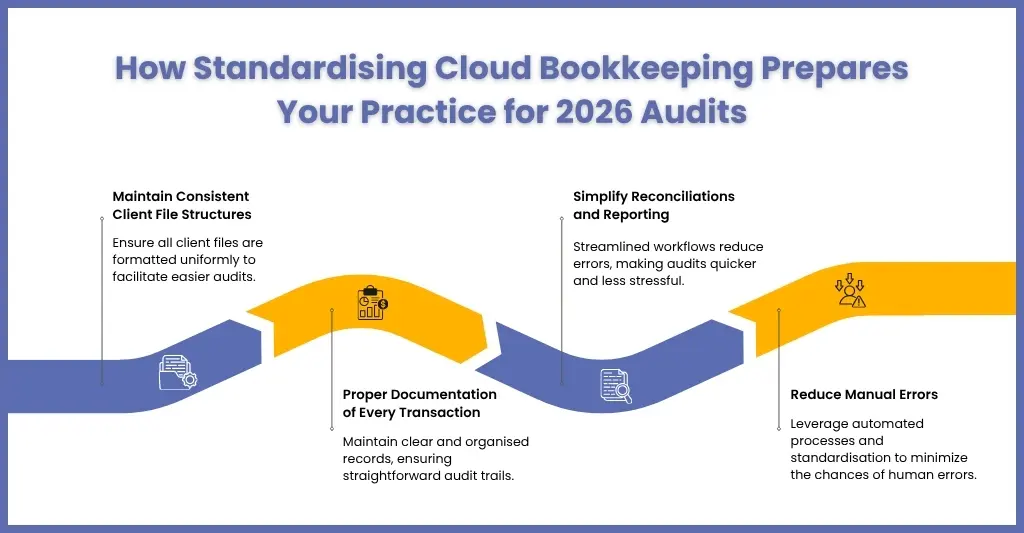
Standardised cloud bookkeeping makes a practice audit-ready by keeping every client file structured, documented, and reconciled continuously through the year, so an auditor is checking a maintained record rather than a rebuilt one. Audit readiness is no longer an end-of-year exercise; it’s continuous monitoring.
Standardisation helps you in being audit-ready by:
- Maintaining consistent client file structures
- Ensuring all transactions are properly documented
- Simplifying reconciliation and reporting processes
- Reducing manual errors that lead to audit queries
Common FAQs About Cloud Bookkeeping
How does Xero’s cloud-based accounting system improve bookkeeping efficiency?
Xero is a cloud-based accounting platform used by UK bookkeepers to automate bank feeds, apply predefined categorisation rules, and connect with add-ons like Dext for receipt capture. Multi-user access lets accountants and clients work in the same file at the same time. Together, these features cut manual data entry and shrink the reconciliation time a practice spends on each client every month.
What Is Cloud Bookkeeping and Why Is It Important for 2026?
Cloud bookkeeping is the practice of recording and managing a client’s financial transactions in an internet-hosted platform such as Xero, QuickBooks Online, or Sage, rather than desktop software. It matters for 2026 because Making Tax Digital for Income Tax becomes mandatory from 6 April 2026 for sole traders and landlords earning over £50,000, requiring digital records and quarterly HMRC submissions.
Is Cloud Bookkeeping Secure?
Yes. Reputable cloud bookkeeping platforms protect client data with end-to-end encryption, multi-factor authentication, and GDPR-compliant storage and processing, typically hosted in UK or EU data centres with regular independent security audits. Practices should still confirm a provider’s specific certifications, such as ISO 27001, and enable multi-factor authentication on every staff and client account before granting access.
Can Cloud Bookkeeping Reduce Dirty Data Risks?
Absolutely. Standardised workflows, automated bank feeds, AI-driven categorisation, and outsourcing support significantly reduce errors, inconsistencies, and duplicate entries.
Conclusion
Dirty data is quicksand that easily bog down your practice, slow down workflows, and create compliance issues. The solution is standardised cloud bookkeeping, combined with automation and outsourced support, which is present and future of accounting and bookkeeping.
The benefits of it are:
- Consistent, accurate data across all clients
- Reduced manual effort and errors
- Real-time reporting and dashboards
- Audit-ready records
- Scalable support during peak workloads
With partners like Corient, you can ensure that client data is clean, MTD-compliant, and ready for 2026 audits, all while freeing internal teams to focus on high-value advisory work.
With Corient’s bookkeeping outsourcing team, client data stays MTD-compliant and audit-ready across Xero, QuickBooks Online and Sage — freeing internal staff for higher-value advisory work. Talk to Corient about standardising your clients’ bookkeeping
