

Accounts payable workflow automation uses software to capture supplier invoices, match them to purchase orders, route approvals by rule and post payments to your accounting system with minimal manual input. For UK accounting practices, it cuts invoice processing costs, strengthens VAT audit trails under Making Tax Digital, and prepares clients for mandatory e-invoicing from 1 April 2029.
Let’s be honest, how many times do you face these questions while operating your practice?
- “Has this invoice been approved?”
- “Who signed this off?”
- “Why is this supplier chasing us again?”
- “Is this already paid?”
Do these questions keep coming up frequently? Then your accounts payable process must be in manual format, if not completely broken.
This guide is written for UK accounting practices running payables at scale, either for the firm itself or across a client portfolio. The pressure is coming from two directions at once. Making Tax Digital for Income Tax went live on 6 April 2026 for qualifying income above £50,000, and the threshold falls to £30,000 in April 2027 and £20,000 in April 2028 (GOV.UK). Behind it sits the e-invoicing mandate from 1 April 2029. Both require clean, structured, digitally traceable invoice data. Neither is satisfied by a shared inbox and a spreadsheet.
That is what makes accounts payable workflow automation a structural requirement rather than an efficiency project.
What Is Accounts Payable Workflow Automation?
Accounts payable workflow automation is the use of software to run the invoice-to-payment cycle — capture, coding, matching, approval, payment and reconciliation — with minimal manual intervention. It replaces email approval chains and manual data entry with rule-based routing and a time-stamped digital audit trail.
For your practice, such automation is relevant due to:
- HMRC’s MTD framework
- VAT reporting requirements
- Digital record-keeping obligations
- Increased scrutiny during compliance checks
- The 1 April 2029 e-invoicing mandate for all VAT invoices
Automation creates structure, and structure reduces risk.
How Does an Automated Accounts Payable Workflow Actually Work?
An automated accounts payable workflow runs in six stages: invoice capture, data validation, purchase order matching, rule-based approval routing, payment execution and automatic reconciliation. Each stage passes structured data to the next without re-keying, and every action is time-stamped into an audit trail.
Stage 1 — Invoice capture
Invoices arrive by email, supplier portal, EDI or scan. OCR and AI extraction read supplier name, invoice number, dates, net, VAT and line items, regardless of layout. Incomplete or inconsistent documents are flagged rather than posted. From April 2029 this stage largely disappears for VAT invoices, because structured e-invoice data will flow directly between systems.
Stage 2 — Data validation
The system checks the extracted data against your rules before anything reaches an approver: is the VAT number valid, is the VAT rate correct for the supply, does the arithmetic reconcile, has this invoice number already been posted for this supplier. Duplicate detection at this stage is the single most valuable control in the whole workflow.
Stage 3 — Purchase order matching
Two-way matching compares invoice to purchase order. Three-way adds the goods received note. Discrepancies are held in an exceptions queue with the variance shown, rather than being discovered at quarter-end.
Stage 4 — Approval routing
Matched invoices are routed by rule — value band, cost centre, department, supplier category — to the right approver, on any device. Every approval, rejection, comment and reassignment is logged. Where an invoice is sitting becomes visible instead of inferred.
Stage 5 — Payment execution
Approved invoices queue for payment on the optimal date. Batch runs reduce transaction volume, and scheduling against the cash position lets clients capture early-settlement discounts — commonly one to three per cent — without anyone monitoring due dates manually.
Stage 6 — Reconciliation and reporting
Payments match to bank transactions automatically and post to Xero, Sage, QuickBooks or IRIS. Dashboards show live payables, ageing and approval bottlenecks, which is the data that turns a compliance conversation into an advisory one.
Accounts Payable Automation vs Manual Payables – A Side‑by‑Side Comparison
The difference is not speed, it is control. A manual process stores its state in people’s inboxes and memories; an automated one stores it in a queryable system. That is why automation survives staff turnover, HMRC enquiries and client growth, and manual payables does not.
| Manual AP Process | Accounts Payable Workflow Automation |
| Email-based approvals | Pre-defined digital approval routes |
| Manual data entry | Automated invoice capture |
| High risk of duplicate payments | Built-in duplicate detection |
| Poor visibility of liabilities | Real-time dashboard tracking |
| Delayed month-end close | Faster reconciliation cycles |
| Limited audit trail | Full digital audit logs |
What Are the Key Features of Effective Accounts Payable Workflow Automation?
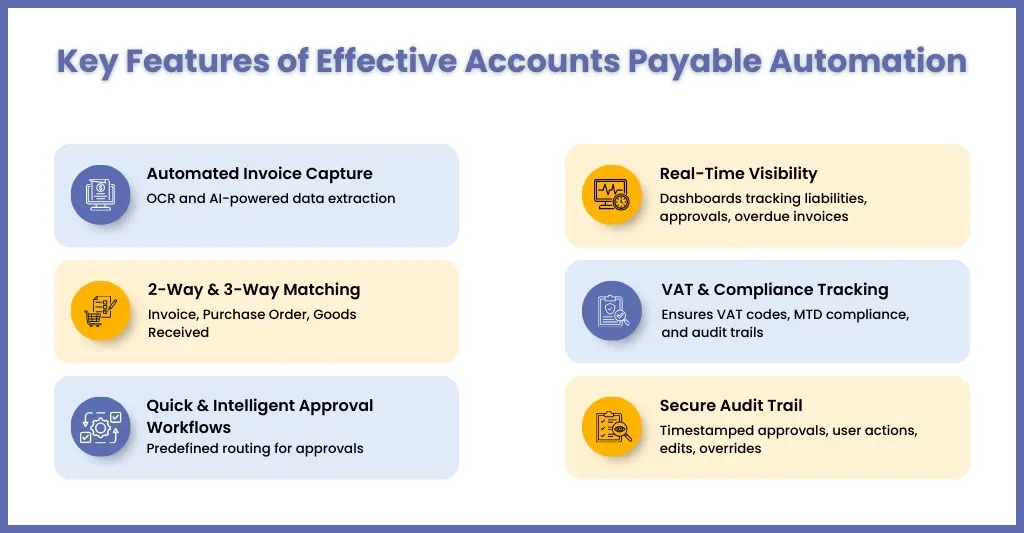
Six features separate a workflow that holds up under audit from one that merely moves faster: automated invoice capture, two- and three-way matching, rule-based approval routing, real-time liability visibility, VAT and MTD compliance tracking, and an immutable audit trail. A system missing any one of these will create work somewhere else.
All accounts payable workflow automations are not the same, but if it has all the right features, things will move smoothly.
Automated Invoice Capture
Manual data entry is an open invitation for errors. An effective system uses OCR (Optical Character Recognition) and AI-powered extraction to:
- Capture invoice data from email, portal, or EDI
- Auto-populate supplier details, VAT amounts, invoice numbers
- Flag incomplete or inconsistent data
For UK practices managing multiple clients, this is critical. A single mistyped VAT amount can distort quarterly returns under HMRC’s MTD framework.
2-Way and 3-Way Matching
Frauds and duplicate payment often fall in between the cracks when the controls are weak. To cover these gaps, you will need the following matching processes.
2-way matching compares:
- Invoice vs Purchase Order
3-way matching compares:
- Invoice vs Purchase Order vs Goods Received Note (GRN)
This ensures:
- The invoice amount matches the agreed pricing
- Goods were actually received
- Services were authorised
Quick And Intelligent Workflows Approvals
Under the manual system, approvals come through email and meetings.
Under automation, predefined routing rules are designed based on:
- Invoice value thresholds
- Department ownership
- Supplier category
- Cost centre
For example:
- Under £1,000 → Department Manager approval
- Over £5,000 → Partner sign-off required
It helps remove ambiguity and speeds up the decision-making process.
Real-Time Visibility – Know Your Liabilities at Any Moment
Cash flow will throw you some nasty surprises if you lack visibility.
A strong system provides dashboards showing:
- Outstanding liabilities
- Pending approvals
- Overdue invoices
- Upcoming payment runs
- Supplier concentration exposure
Improvement in visibility will help you in:
- Advisory conversations
- Cash forecasting
- Working capital planning
Instead of reacting to suppliers, you anticipate them.
VAT & Compliance Tracking – Built for UK Regulatory Standards
Even a small mistake in VAT return filing can be expensive for you and your clients.
To avoid that, you will need automation that will ensure:
- Correct VAT codes are applied
- Digital records are maintained for MTD compliance
- Audit trails meet HMRC expectations
- Supporting documentation is stored securely
MTD for Income Tax became mandatory on 6 April 2026 for sole traders and landlords with qualifying income above £50,000, extending to £30,000 from April 2027 and £20,000 from April 2028 (GOV.UK). Each wave brings clients into scope who have never kept digital records. If your VAT outsourcing and Making Tax Digital processes depend on chasing paperwork after the quarter ends, each threshold drop multiplies the workload.
Automation will help you in achieving that through:
- Accurate VAT submissions
- Faster reconciliations
- Reduced compliance risk
For you, this is like a value-added feature.
Secure Audit Trail – Every Action Logged, Every Decision Recorded
Expect certain questions during an HMRC investigation:
- Who approved the invoice?
- When was it approved?
- What changes were made?
- Why was it paid?
You need to have answers to these questions, and for that, you will need a proper accounts payable workflow automation system that logs:
- Approval timestamps
- User actions
- Edits and overrides
- Payment confirmation
This creates an undeniable compliance record and ensures internal controls align with good governance practices.
How Does the April 2029 E-Invoicing Mandate Affect Accounts Payable?
E-invoicing becomes mandatory for all UK VAT invoices in business-to-business and business-to-government transactions from 1 April 2029, confirmed at Budget 2025. On 23 June 2026 the government confirmed Peppol as the interoperability framework, using a decentralised four-corner model with no real-time reporting to HMRC in the first phase.
This is the largest change to UK invoicing rules in decades and it lands squarely on accounts payable. An e-invoice is not a PDF. It is structured data passing directly between two finance systems. PDFs, scans, Word files and emailed attachments will not satisfy the mandate. The full implementation roadmap and technical specifications are due at Budget 2026 in November. Source: GOV.UK consultation response — Promoting electronic invoicing across UK businesses and the public sector.
The timeline
| Date | What happens |
| November 2025 | Budget 2025 confirms mandatory e-invoicing for all VAT invoices from 1 April 2029 |
| January 2026 | Government stakeholder collaboration begins, including MTD software providers |
| 23 June 2026 | Peppol confirmed as the interoperability framework; decentralised four-corner model |
| November 2026 | Implementation roadmap and technical specifications due at Budget 2026 |
| 2027 – 2028 | Build, pilots and parallel running |
| 1 April 2029 | Mandate live for all VAT invoices, B2B and B2G |
What it means for your AP workflow now
The practical point is that e-invoicing removes the capture stage rather than replacing the workflow. Matching, approval routing, exception handling, payment scheduling and reconciliation all remain, and all of them still need to exist in structured form. A practice that automates AP in 2026 is not doing work it will have to redo in 2029 — it is building the layer the mandate assumes you already have.
Three things worth doing before the Budget 2026 roadmap lands:
- Clean supplier master data now. Duplicate records, missing VAT numbers and inconsistent naming will break structured invoice exchange exactly as they break OCR matching today.
- Confirm that any platform you are evaluating supports Peppol and EN 16931-aligned structured data natively, not as a roadmap promise.
- Start the supplier conversation early. Note that NHS suppliers have already been required to invoice through Peppol since 2019, so some of your clients are further along than they realise.
Accounts Payable Workflow Automation Example
The clearest way to see the difference is to follow one invoice through both processes. Below is a mid-sized UK practice handling payables across a client portfolio, before and after.
Let’s make this practical.
Imagine a mid-sized UK accounting practice handling accounts payable for multiple clients.
Before automation:
- Invoices arrive via email.
- Admin manually enters details into Xero.
- Approval emails go back and forth.
- Supplier calls asking for payment status.
- Duplicate invoice slips through.
- VAT reconciliation at quarter-end reveals discrepancies.
Now, with Accounts Payable Workflow Automation:
- Invoices are auto-captured.
- Data is validated instantly.
- System flags duplicates.
- Approval is routed automatically.
- VAT codes are applied correctly.
- Payment is scheduled based on cash flow priorities.
- Full audit log is stored digitally.
The result?
- Faster processing
- Fewer errors
- Better cash control
- Happier suppliers
That’s not theory. That’s operational sanity.
How Does Automation Improve Cash Flow and Supplier Relationships?
The goal of automating accounts payable workflow is to improve the cash flow of your clients and supplier relationships. This is achieved from the benefits it offers, such as:
Timely Payments
One of the major benefits of implementing accounts payable workflow automation software is the assurance that all payments will be sent or collected on time. By automating the payment schedule, you will be in a position to eliminate late payments completely.
Fraud Reduction
Fraud reduction will be the primary objective of automating the workflow process. This is achieved through the software, which will weed out suspicious or habitual offenders or highlight them for your attention. Plus, it will keep an oversight into taxes and their regulations.
The specific control that matters most is supplier bank detail changes. Invoice redirection fraud works by altering payment details on a legitimate invoice, and an automated system flags that change against the supplier master record before payment rather than after.
Removing Manual Data Entry
Entering accounts payable data manually is a time-consuming process, and it’s an invitation for human errors. However, through automation of data entry through the right software, you will be saving time on data entry and corrections, which can be used for other high-value tasks.
Centralisation to Reduce Paperwork
Keeping centralised accounts is one of the best ways of avoiding multiple issues, and automating accounts payable workflow helps you in achieving that. By centralising and automating the accounts payable process, you are automatically reducing tonnes of paperwork and the increase your ability to handle all financial transactions and approvals through one software.
Added Security
Automation through software will add an additional layer of security in the invoice approval workflow. This makes it easier to identify and reject fraudulent invoices.
Improved Audit Trails
You will be in a position to check financial records at ease due to the automation of the AP workflow. Through an automated system, audit teams will get access to all the information without the delays associated with a paper-based audit.
What Are the Common Implementation Challenges and How Do You Overcome Them?
Four problems account for most failed AP automation rollouts: staff resistance, poor supplier master data, client fear of losing control, and weak integration with the existing accounting stack. None of them are caused by the technology. All of them are caused by rushing the rollout.
We will never say that implementing accounts payable automation is a path full of roses. However, it would be wrong to say that these challenges are associated with automation, but rather crop up due to rushed implementation, misunderstandings, and resistance.
The good news is that these challenges can be managed easily. Let’s understand these challenges deeply and the solutions to overcome them.
Resistance to Change
Whether it’s your internal accounting team or your clients, get something new that they don’t know of, and you will face resistance, and the same applies to the automation of accounts payable workflow. Both your team and clients are familiar with the manual process, and automation might bring a sense of insecurity and confusion.
Automation may sound like:
- Extra work
- Loss of familiarity
- A threat to job roles
No wonder resistance will take place
The solution to this is:
Starting a pilot project with a section of your clients. This will give time for others to familiarise themselves with automation.
Poor Data Standardisation
Automation will work flawlessly and show correct outputs only when the data is consistent. When we talk about inconsistent data, we are talking about:
- Duplicate supplier records
- Incorrect VAT numbers
- Missing payment terms
- Inconsistent naming conventions
If not addressed, automation will struggle with:
- Matching invoices
- Generating accurate reports
- Ensuring VAT compliance
The only way to overcome it is through clean and consolidated supplier master data before rollout.
Fear of Losing Control
It’s a fear that keeps coming up among your clients. They mostly think that automation is equal to:
- Reduced oversight
- Delegated responsibility
In reality, well-designed automation increases control. Manual processes rely on memory and email threads.
How to overcome it:
Choose an automation software that offers:
- Structured approval hierarchies
- Real-time dashboards
- Role-based access controls
- Full audit trails
With these in place, your clients can see:
- Outstanding liabilities
- Pending approvals
- Payment timing
- Supplier exposure
That’s not less control, that’s clearer control.
Integration Concerns
Whenever you think about integrating a new software into your system, the first thing that comes to your mind is its compatibility with your existing system.
Most practices use:
- Xero
- Sage
- QuickBooks
- IRIS
- BrightPay
- Other cloud accounting tools
If integration is weak, automation creates duplication rather than efficiency.
Solution:
The ideal solution is to work with specialists who understand UK accounting practice workflows and have the expertise of accounting software ecosystems.
This is where outsourcing partners like Corient add value without adding much cost. It is among the top accounts payable outsourcing companies and through their bookkeeping outsourcing services, combined with automation expertise, they offer a structured process management.
Future of Accounts Payable Workflow Automation
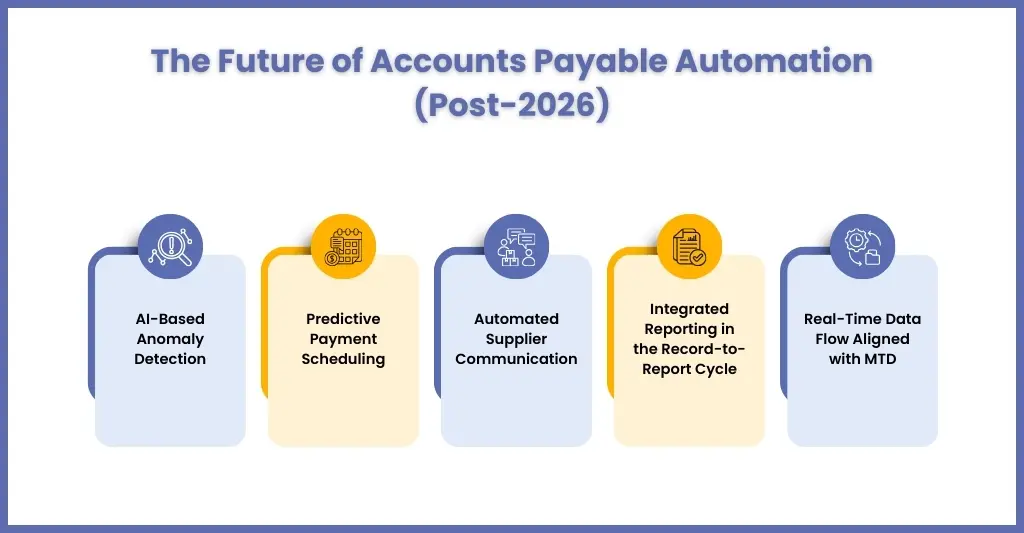
In 2026 and beyond, accounts payable workflow automation is moving ahead towards new frontiers like:
- AI-based anomaly detection
- Predictive payment scheduling
- Automated supplier communication
- Integrated reporting into the record-to-report cycle
- MTD-aligned real-time data flow
With HMRC enforcing digital compliance and structured reporting, the manual accounts payable process will be considered outdated, making automation of the process necessary.
People Also Ask
How long does it take to implement AP workflow automation in a practice?
Most UK practices reach a working baseline in four to eight weeks. The variable is not the software but the state of your supplier master data and how many clients you onboard at once. Starting with a single pilot client group through one full month-end cycle is faster overall than attempting a portfolio-wide rollout.
Will the April 2029 e-invoicing mandate replace the need for AP automation?
No. E-invoicing removes the capture stage, because structured data arrives directly from the supplier’s system. Everything after capture — matching, approval routing, exception handling, payment scheduling and reconciliation — still has to happen. Practices that automate now are building the layer the mandate assumes already exists rather than duplicating work.
How much does manual invoice processing cost a UK practice?
Manual processing costs UK businesses between £4 and £25 per invoice, averaging around £15, against roughly £2 once automated. At 500 supplier invoices a month that is a difference of about £78,000 a year. The figure excludes senior staff time spent resolving duplicates and reconstructing approval chains, which is usually larger.
Should a practice automate accounts payable in-house or outsource it?
Automate in-house if you have a dedicated operations or systems function with capacity to configure and maintain workflows per client. Outsource the transactional layer when senior time is the constraint. Most large practices run a hybrid: approval authority and client relationships stay internal, while capture, coding and exception handling go to a specialist partner.
Is AP automation compliant with UK HMRC regulations?
Yes, when implemented correctly. Automated systems capture and categorise transaction data digitally at the point of entry, which supports the digital record-keeping requirements under Making Tax Digital for VAT and Income Tax. The time-stamped approval log also gives you a defensible audit trail during an HMRC compliance check, which email threads do not.
Conclusion
The question is not “can you afford to automate?” but “how long can you afford not to automate?” Accounts payable automation may not look attractive, but it has long-term significance going beyond 2026. Accounts payable workflow automation will transform your financial operations, saving time and reducing costs while improving accuracy and compliance.
There is also a fixed deadline now. E-invoicing becomes mandatory for all UK VAT invoices on 1 April 2029, and the implementation roadmap arrives at Budget 2026. Practices that structure their payables data this year will migrate; practices that wait will rebuild under time pressure.
By addressing common challenges, you can successfully implement accounts payable automation and reap its long-term benefits. Accounts payable workflow automation allows your practice to:
- Reduce errors
- Protect compliance
- Improve cash flow control
- Free up senior staff time
- Scale without hiring reactively
If tackling the challenges associated with accounts payable automation is consuming much of your time and resources, then approaching a professional outsourcing provider makes sense. Here’s where Corient comes in: we help UK accounting practices implement structured, automation-backed accounts payable processes delivered through secure, scalable outsourcing models aligned with UK compliance standards.
Time is running out! Connect with us and see the difference.
